Mr. Weather is a tool to grab weather forecast information of any worldwide location, right on your desktop screen. All you have to do is just enter your city name, zipcode or landmark to check out the weather forecast information using Mr. weather. This weather forecasting tool includes information like temperature, wind speed, wind chill, weather condition, weather forecast for the current date and for next date.
It’s nice to sit at home and check out the weather forecast information of various regions, right from your desktop.
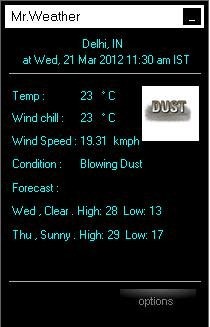
This weather forecast information software has got a very innovative search engine. You can search different locations, with the help of zip code, landmark or town. It provides all information in a small rectangular window which makes it elegant in design and shape.
How To Use Mr. Weather:
Step 1 : Launch Mr. weather on your desktop.
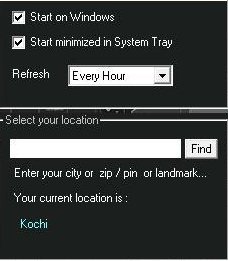
Step 2 : Click on “Option” to find the weather forecast information.
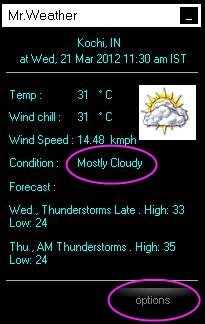
Step 3 : Enter your city or zip code or landmark
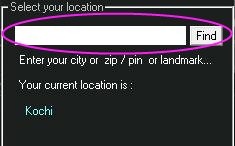
Step 4 : Then, click on find to search for your location and click on “Okay”.
Key Features Of Mr. Weather To Show Weather forecast Information:
- Provides an user-friendly interface.
- Free to use and easy to access.
- You can set the refresh rate after every hour or 3Hrs or 6Hrs or 12Hrs.
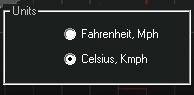
- Previews the temp in Celsius or Fahrenheit degree.

- You can set the wind speed in mph or kmph.
- Shows the weather forecast for the next day.
- Shows the weather condition like blowing dust, dust, cloudy and lot more.
- Views the actual time of forecast, date and region.
- Set start-up on Windows and start minimized in system tray.

- Shows the weather report for the next day also.
- You can view the minimum and maximum temp of the current date and next date.
How To Install Mr. Weather On Your Desktop:
- Visit the link below to install Mr. weather on your desktop, or just click here.
- Click on the download link provided on the website.
- A zip file will be downloaded to your PC.
- Unzip to extract the setup file.
- Open the setup downloaded and click on “Run”.
- Follow further instructions to install Mr. weather to show weather information on your desktop.
Mr. Weather automatically gets installed to your desktop. This is an efficient tool to know about the weather forecast information of different regions. Go ahead and try it out.
