Password Generator XP is a free password generating software that helps you to generate as many passwords as you can. This small in size password generator comes with a very basic and straight-forward interface suitable even for the beginners. The interface comes with general and advanced options for password generation, it even comes with space below to show you the generated passwords.
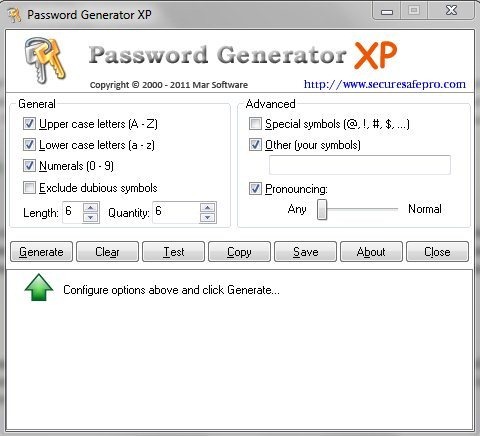
General Options include upper case letters option, lower case letters option, numerals, option to exclude dubious symbols, password length and password quantity option. So you can choose to include upper case letters, lower case letters and numerals in the passwords. You can even set the password length and quantity of the password. Advanced options include special symbols option, other (your symbols) option and pronouncing option. Special symbol option lets you add special symbol in the password. Using other ( your symbol) option you can add your own symbol in the password. Pronouncing option lets you create passwords which you can pronounce. For this you need to check the pronouncing option and move the slider towards normal.
With Password Generator XP, you will never have to think out new and strong passwords, as this freeware is an ultimate solution to get strong passwords in no time.
Don’t forget to check out our post on Awesome Password Generator reviewed by us.
Features Of Password Generator XP
- Create any number of passwords.
- Small in size password generator.
- Choose to include upper case letters, lower case letters, numerals and symbols in the passwords.
- Exclude dubious symbols from your password.
- Allows you to generate pronouncing passwords.
- Test passwords with the help of test option.
- Save passwords to the text file or simply copy a password or passwords to clipboard.
- Straight-forward and easy to understand user interface.
You would also like to check out our post on 5 free online password generator.
How to Download And Install Password Generator XP
- Visit the homepage of Password Generator XP and click the download link.
- An exe file of Password Generator XP will be downloaded into your system.
- Run the exe file of Password Generator XP and follow further instructions of installation.
Password Generator XP is a simple and easy to use password generator that lets you generate strong passwords in no time. Try Password Generator XP for free.
