• Home
  • Software Testing Service
  • About US
    • Privacy Policy
    • Disclosure
  • Write For Us
  • Submit Software
  • Contact Us
    • Subscribe
I Love Free Software
Best free software available all over the web. The free software categories include Windows Software, Social Networking Tools, and software installation videos.


  • Featured
  • Windows
  • Web Applications
  • App Store
  • Android
  • iPhone
  • iPad
  • Windows 8
  • Social Networking
  • Programming Tools

Automatically Organize Photos in Sub-Folders by Date: fOrganiz

By Arvind Kumar on April 20, 2012 | Sponsored Links

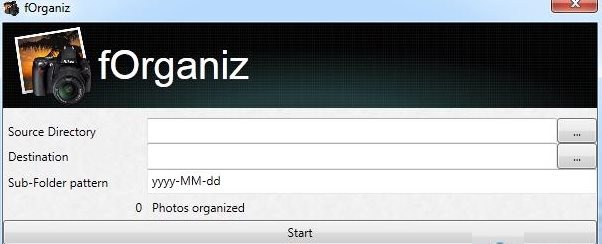
fOrganiz is free software to automatically organize photos in sub folders by date format. You can organize any pictures from subdirectories in dd-mm-yyyy format. This free software is very fast and easy to access and use.

fOrganiz is best suitable application which works according to your preference. If you want to check out your pictures in date by date format, then definitely you must try this out.

You can check the count of photos arranged at each access, you might be thinking why do I require this ? Then you need to try out and judge whether you require this free software to automatically organize photos on your PC.
fOrganiz
Sponsored Links

Note: You need to have .net Framework 4.0 to run this free software to automatically organize photos in sub-folders on your PC.

Check the Usage To Organize Photos In Subfolders By Date:

  • Launch the program on your PC.
  • Click on the “source directory” to automatically organize photos.
  • Assign the “Destination” for all your output.
  • Set the sub-folder pattern in any format like the default one is yyyy-MM-dd
  • And at last hit on “start“ to begin the task.
  • You may also check out number of photos organized at each attempt.

Key Features Of This Software To Automatically Organize Photos:

  • Provides quick results.
  • Fast and easy to access.
  • Eliminates the work pressure in assigning the pictures.
  • Arranges according to Sub-folder patterns.
  • Shows the number of photos organized in one go.
  • Processes very fast.
  • Elegant look and design.
  • 100% free of cost.

How To Install fOrganiz:

  • Go to the home page of the software.
  • Click on “Download” link available on the screen.
  • Click on the downloaded setup to run the program.
  • Just follow the on-screen instructions and you will soon find the software installed in your PC.

Yupp…there you are. Here is your fOrganiz, start organizing your photos now.

In short, fOrganiz is an excellent photo organizing software to manage photos so that it becomes easier to find a photo whenever required. Go ahead and download fOrganiz now..!

Home Page: Click Here
Works With: Windows
Free / Paid: Free

Link to This Page:


You Might Also Like:

  1. Automatically Organize Photos by Events
  2. Freeware to Stamp Date on Photos
  3. Free Photo Organizer To Organize Your Photos: Canon My ImageGarden
  4. Systweak Photo Album – Freeware to Organize Digital Photos
  5. Adebis Photo Sorter: Automatically Sort Photos on PC

Be the first to know about Latest Free Software:

  • Join us on Facebook
  • Subscribe to our RSS Feed
  • Follow us on Twitter
  • Subscribe to Email Updates:

Posted in Image & Photo | Tagged organizer | Leave a response

Arvind Kumar

« Previous Next »

Featured Posts

  • 5 Free Snippet Managers To Manage Code Snippets
  • 5 Free Online Tools To Test Website In Different Resolutions
  • 5 Free Microsoft Access Alternatives
  • 5 Free IP Notifier Apps
  • 5 Online Mapping Websites
  • 5 Free Alternatives To iGoogle
  • 7 Websites To Download Windows 8 Themes
  • 5 Best Free Calculator Apps For Windows 8

Join More than 15,000 Followers!

Enter your Email Address
  • Submit Software
  • Software Testing Service
  • Write For Us
  • About Us
  • Privacy Policy
  • Disclosure
  • Contact Us

Link to Us:

Did we review your software here? Feel free to flaunt this badge on your website:

Free Software

Use this Code:

Copyright © 2013 I Love Free Software.

Powered by WordPress and Hybrid. New - H