SecureSafe is a free online Storage Vault that is meant to protect your important documents, passwords and allows you to retrieve and manage them easily. The emphasis of this software is to provide you maximum security. Just as a locker is to store your valuables, you have this online Storage Vault in the form of SecureSafe to care of your digital documents and passwords. The specialty of this platform is that your documents can be retrieved at any time and from anywhere including your web browser, iPhone, iPad or Android app.
Securing your documents and passwords with SecureSafe
The below mentioned steps would help you to protect your documents and passwords:
- Open the website. Since it is an online platform, you need to ‘Sign up’ for the service by clicking on the appropriate button on the homepage.
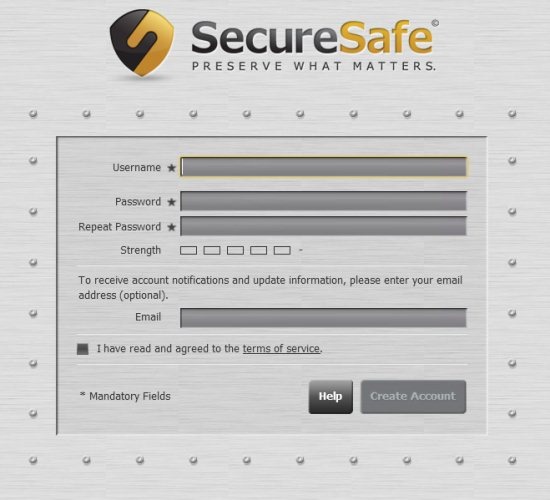
- Fill in the complete details and create your account. Once your account is created, you can login to get started.
You can also check out password manager software available for free.
Key features of this online Storage Vault
- Store your important and critical files in your account. You have different categories where you can upload your file and keep it safe. Accessing the file is also easy as you can access your account from anywhere.
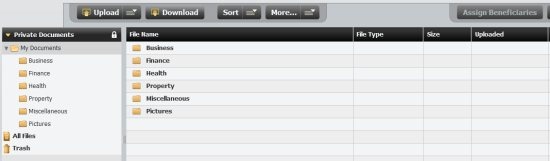
As you can see in the snapshot above, there are different categories such as business, finance, health, property, miscellaneous and pictures. You can upload and download files here. You can upload multiple files and even folders. For uploading a folder, you need to create a zip file initially and then upload it. The unzip action can be performed by clicking on ‘More’->Unzip file.
- Storing passwords with SecureSafe is also easy. Just navigate to the PasswordSafe tab and begin making your entries.

Simply click on ‘Add password’ and furnish the details to keep a track of all your passwords.
- One of the most innovative features of SecureSafe is that you can assign beneficiaries to your data. This makes your data available to your family and friends in case of emergency when you are not available. I think that this is an important feature as in the long run you never know what might happen. Assigning beneficiaries would definitely help and you must make the most of this feature.
- SecureSafe also boasts of secure delivery. This is particularly good as it is fast and safe. Your confidential data is handled securely and you need not worry while using SecureSafe.
Verdict
In all SecureSafe is a safe vault to keep your digital contents secure. You can even upgrade to the other accounts which are Password PRO, Silver and Gold, the difference being in the privileges offered in terms of storage space, charges, passwords stored, number of beneficiaries etc. So depending upon your requirements you can go for the appropriate account. If you need SecureSafe for personal needs then the free account is apt for you. Overall, this is a better platform to organize all your critical data as compared to your notebooks or others. Working is simple and the data is accessible from any platform. So give it a try!
