Cubic Explorer is a free file explorer that lets you manage your files and folders in an efficient manner. It is a good alternative for Windows Explorer. Cubic Explorer is really one of the most powerful file manager that I have come across.
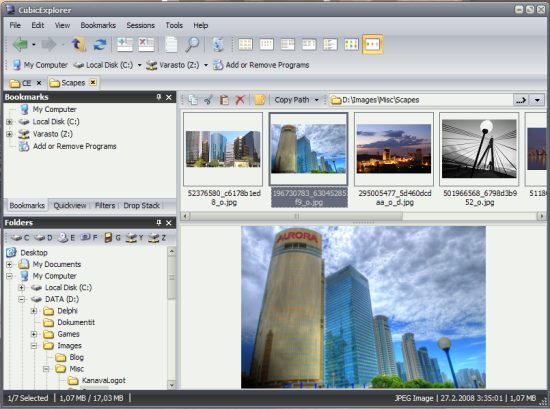
Cubic Explorer gives an integrated 3-window interface.
- There is a small window in top left corner that serves many purposes. The best use is that it can be used as a quick file viewer. It supports many type of files, including media files, and text files. Just click on any file, and you can see a preview of it. So, if you click on a video file, you can see a quick review of it in this window. Apart from that, this can also show you your favorite/bookmarked files and folders. This presents a quick way for one click access to your favorite files.
- Below it there is another window that shows the hierarchical folder structure that you are browsing.
- And the main window on the Right side is where you can explore all the files.
Managing files and folders can be a bit of a mess when they are not in the right place. Some files get lost and we need to search for our favorite files and folders in all the drives. But this program efficiently manages your stuff so that you need not look for them elsewhere. It saves you all the trouble of finding your favorite files and keeps them well organised in its interface.
Some other related software that you can also read about are: BBox, 7Plus, and SDExplorer.
Here are some of the features of Cubic Explorer:
- It has a neat and clean interface
- It lets you bookmark your favorite files and folders
- It has filters that shows only certain file types
- It has an inbuilt text editor
- It shows the previews of files
- It allows you to set the transparency level for programs
- It has many themes to choose from
- It lets you create your own theme
- It supports shortcut keys
- It supports breadcrumb navigation
- It saves your sessions
- You can group your files under titles like work, home etc
- Quick and detailed file searching
Cubic Explorer lets you save all your important and commonly used files in it and you won’t need to search and browse for them anywhere else. This program is completely free of cost.
