• Home
  • Software Testing Service
  • About US
    • Privacy Policy
    • Disclosure
  • Write For Us
  • Submit Software
  • Contact Us
    • Subscribe
I Love Free Software
Best free software available all over the web. The free software categories include Windows Software, Social Networking Tools, and software installation videos.


  • Featured
  • Windows
  • Web Applications
  • App Store
  • Android
  • iPhone
  • iPad
  • Windows 8
  • Social Networking
  • Programming Tools

How to Edit Title and Description of Links in Facebook

By Jaya on November 16, 2011 | Sponsored Links

When trying to paste a link in your Facebook account, you cannot control the title and description that appears with it. Sometimes this title and description are just too long or sometimes the links look like spam link. So your friends don’t click those links and never get to see what you posted. So to eliminate this problem here is how to edit title and description of links in Facebook.

How to edit title and description of links in Facebook:

  • Log into your Facebook account.
  • Paste the link or URL you want to share in the Update Status box.
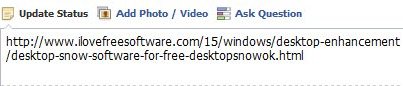
How to Edit Title and Description of Links in Facebook0
Sponsored Links

  • Once you paste the link the title and description start appearing in a window below the pasted link, as shown below.
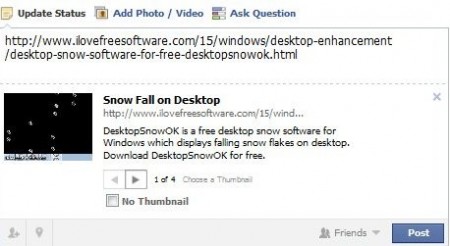
How to Edit Title and Description of Links in Facebook01

  • Hover the mouse cursor over the title of the link. The entire text would be highlighted with yellow color background.
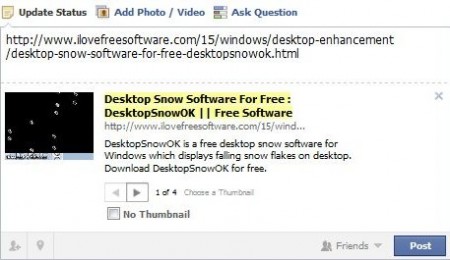
How to Edit Title and Description of Links in Facebook

  • Double click the selection and an editing textbox would open up.
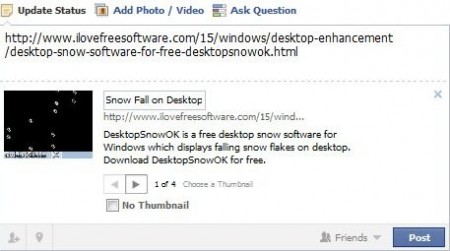
How to Edit Title and Description of Links in Facebook 1

  • Go ahead and change the title of the link as you like.
  • Now coming to the description part, same procedure has to be followed. Hover the mouse cursor over the description text and it will appear highlighted with yellow color background.

How to Edit Title and Description of Links in Facebook 2

  • Double click the selection and you will get an editing textbox. Go ahead and add your own description.
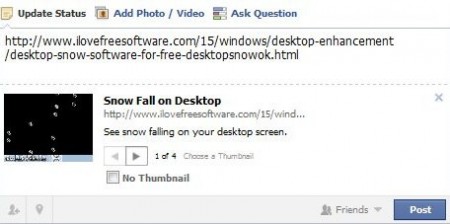
How to Edit Title and Description of Links in Facebook 3

  • Now click the post button to post this link to your wall.
  • Here is how this link will appear.

How to Edit Title and Description of Links in Facebook 4

You can also check out other Facebook tips like update Facebook status via SMS reviewed by us.

Isn’t it easy to edit title and description of a link in Facebook. So go ahead paste links to your favorite videos or funny clips and edit the tile and description as per your choice.

Link to This Page:


You Might Also Like:

  1. Facebook Security from Spam or Malicious Links with ShareSafe
  2. Postcron: Schedule Posts on Facebook
  3. Chrome Extension To Manage Multiple Links With Linkclump
  4. Preview Links on Reddit by Hovering Over With SeeIt Chrome Extension
  5. How to Create a Facebook Group

Be the first to know about Latest Free Software:

  • Join us on Facebook
  • Subscribe to our RSS Feed
  • Follow us on Twitter
  • Subscribe to Email Updates:

Posted in Facebook tools, Social Networking | Tagged description text, facebook tools | Leave a response

Jaya

« Previous Next »

Featured Posts

  • 5 Free Snippet Managers To Manage Code Snippets
  • 5 Free Online Tools To Test Website In Different Resolutions
  • 5 Free Microsoft Access Alternatives
  • 5 Free IP Notifier Apps
  • 5 Online Mapping Websites
  • 5 Free Alternatives To iGoogle
  • 7 Websites To Download Windows 8 Themes
  • 5 Best Free Calculator Apps For Windows 8

Join More than 15,000 Followers!

Enter your Email Address
  • Submit Software
  • Software Testing Service
  • Write For Us
  • About Us
  • Privacy Policy
  • Disclosure
  • Contact Us

Link to Us:

Did we review your software here? Feel free to flaunt this badge on your website:

Free Software

Use this Code:

Copyright © 2013 I Love Free Software.

Powered by WordPress and Hybrid. New - H