Lazy Ass is a free desktop tool to remind you to take a exercise break at regular intervals while working on the computer. A major percentage of us spends a large amount of time not doing any physical activity. This can be attributed mostly to long hours in front of the computer and then being too tired to hit the gym. This program is aimed at those very people who don’t get much physical activity.
Features of this exercise break reminder software:
The program is designed to remind the user at a specific interval to get away from the computer and do one of many exercises or tasks that it can choose. The program takes control of the computer for a whole minute so that the user can’t just cancel the notification and get back to doing whatever he was doing before.
- Selectable activities: The program allows the user to select or deselect a particular task. If a person is physically unable to do a particular activity then he/she can deselect it.
- Research-based activities: The activities available within the program are not randomly chosen. Instead, they are based on proper research, according to the program’s developer. Our bodies are designed to work at specific intervals; not doing the requisite work leads to a number of problems, some of which might be very serious.
- Disabling: If a person is feeling particularly lazy on a particular day or is sick, the program can be disabled from the settings. This feature is very useful for those lazy weekend mornings.
Downloading and Installation:
The program is quite small in size; just under 300 kb. Installation is quite simple as well. The program runs on all versions of Windows from XP upwards. It also requires a version of the .NET framework that is more recent than version 2. If all this sounds a bit difficult to digest, rest assured that if your computer has been bought within the last 5 years, the program will run without a problem.
You can also check out eye exercise software while working on computers.
Working and interface:
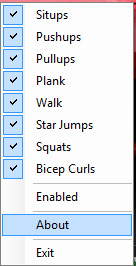
Honestly, this program doesn’t have an interface to talk about. When you click on the program on your desktop or in the Start Menu, an icon appears in the notification area of the desktop. Right-clicking on it opens a small menu showing the various activities that the program will ask the user to do. By default, all the exercises are selected. A user can choose to deselect some if he/she so wishes. Other options include an about button which takes the user to the website of the developer. The program can also be enabled or disabled using the same menu. The program works simply enough, so there are no glitches to report.
Also check out rest break free software to remind you to takes regular rest breaks while working.
Verdict:
Lazy Ass is a simple, yet effective one. However, the motivation to exercise will not come from a simple computer program. If one wishes to get off their butt and work out, they will. Otherwise, they simply won’t. The developer needs to be lauded for such an innovative effort, but people who are lazy will not change due to a computer program.
