• Home
  • Software Testing Service
  • About US
    • Privacy Policy
    • Disclosure
  • Write For Us
  • Submit Software
  • Contact Us
    • Subscribe
I Love Free Software
Best free software available all over the web. The free software categories include Windows Software, Social Networking Tools, and software installation videos.


  • Featured
  • Windows
  • Web Applications
  • App Store
  • Android
  • iPhone
  • iPad
  • Windows 8
  • Social Networking
  • Programming Tools

Free Software To Manage Personal Information: AM-Notebook

By Arvind Kumar on April 14, 2012 | Sponsored Links

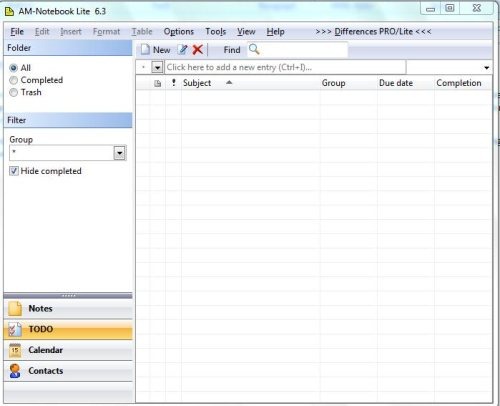
AM-Notebook is a free personal information manager to manage personal information and supports spreadsheet, notes, calendar, and diagrams. This free personal information manager provides easy and convenient way to save all notes, spreadsheet supportive with formulas, flowcharts, tasks, contacts, and To do list.

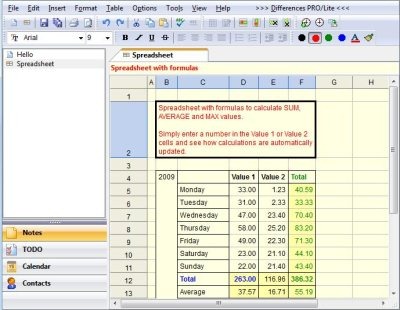
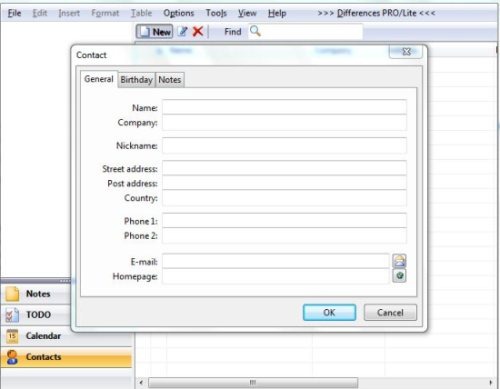
You can use spreadsheet with formulas to calculate average, sum, and maximum values. You can also save notes with entering values and variables. This free software to manage personal information also allows you to save contacts and to easily find them when in need.
AM-Notebook
Sponsored Links

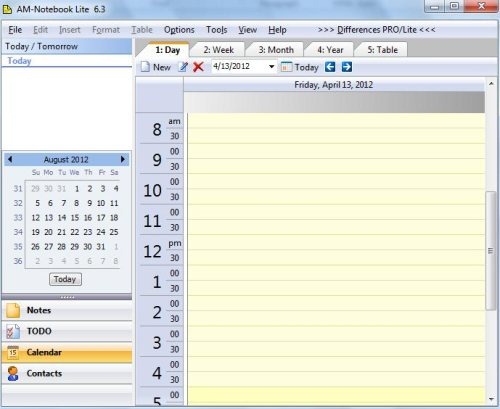
You can even check out weekly, monthly, yearly or day wise calendar, which enables you to track each and every hour of the day. AM-Notebook provides spell check operation to manage personal information with auto correction of words.

Note: Available in Free and Pro version.

Also check out other free personal information manager we reviewed earlier.

Features Of This Free Software To Manage Personal Information:

  • Shows spreadsheet and notes in two different tabs.
AM-Notebook 3

  • Provides notes with many text formats.
  • Shows calendar weekly, monthly, yearly and day wise.
AM-Notebook 2

  • Store all contact information with address list.
AM-Notebook 1

  • Allows to save all notes date by date.
  • Available with to do list.
  • Featured with alarms
  • Provides option for restore and backup.
  • Supports multiple languages.
  • Allows to print and preview the notes.
  • Provides portable edition for USB drive.
  • Enables recurring of task.

How To Install AM-Notebook To Your PC:

  • Visit the website link to download AM-Notebook to your PC.
  • Download the exe file.
  • Choose among the Free and Pro version.
  • You may also choose a portable edition for your USB stick.
  • Proceed with further instruction to install this free software to manage personal information on your PC.

AM-Notebook is an excellent tool to create spreadsheets, add contacts, print notes, set alarm and to assign work on To Do list.

Home Page: Click Here
Works With: Windows 7, Windows Vista, Windows 2003, Windows XP, Windows 2000
Free / Paid: Free

Link to This Page:


You Might Also Like:

  1. Free Wiki-like Notebook for Storing Personal Information: Wikidpad
  2. AllMyNotes Organizer – Free Personal Information Manager
  3. 5 Best Free Personal Wiki Software
  4. Free Web Notebook Application: Piggydb
  5. Free Online Notebook: NotebookG

Be the first to know about Latest Free Software:

  • Join us on Facebook
  • Subscribe to our RSS Feed
  • Follow us on Twitter
  • Subscribe to Email Updates:

Posted in Windows | Tagged personal information manager | Leave a response

Arvind Kumar

« Previous Next »

Featured Posts

  • Top 7 Free Launchers for Android
  • 5 Free Snippet Managers To Manage Code Snippets
  • 5 Free Online Tools To Test Website In Different Resolutions
  • 5 Free Microsoft Access Alternatives
  • 5 Free IP Notifier Apps
  • 5 Online Mapping Websites
  • 5 Free Alternatives To iGoogle
  • 7 Websites To Download Windows 8 Themes

Join More than 15,000 Followers!

Enter your Email Address
  • Submit Software
  • Software Testing Service
  • Write For Us
  • About Us
  • Privacy Policy
  • Disclosure
  • Contact Us

Link to Us:

Did we review your software here? Feel free to flaunt this badge on your website:

Free Software

Use this Code:

Copyright © 2013 I Love Free Software.

Powered by WordPress and Hybrid. New - H