• Home
  • Software Testing Service
  • About US
    • Privacy Policy
    • Disclosure
  • Write For Us
  • Submit Software
  • Contact Us
    • Subscribe
I Love Free Software
Best free software available all over the web. The free software categories include Windows Software, Social Networking Tools, and software installation videos.


  • Featured
  • Windows
  • Web Applications
  • App Store
  • Android
  • iPhone
  • iPad
  • Windows 8
  • Social Networking
  • Programming Tools

SolveigMM AVI Trimmer + MKV: Free Software for Editing Videos

By Mayank on December 13, 2010 | Sponsored Links

SolveigMM AVI Trimmer + MKV is a free video editing software which allows its users to edit videos very easily. This free software is used to cut MKV and AVI video files quickly and without causing any loss to the original video. You can also read other articles on video editing like Avidemux, Cinelerra, and VideoSpin. There are video tutorials available on using some  of these software like Cinelerra Video Tutorial.

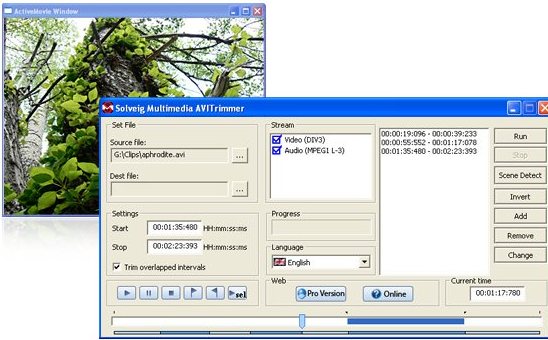
This free program, SolveigMM AVI Trimmer + MKV is very easy to use and has a very simple interface which involves no decoding or encoding for video conversions. Within a few minutes you can split your favourite video clips into fragments. If you are thinking that it’s over than no its not as it also supports Mkv files with video content, great isn’t it.

AVI Trimmer
Sponsored Links

You can easily get rid of all those annoying synchronizing problems as you have this great software, SolveigMM AVI Trimmer + MKV with which you can cut video files using trimmer. Different portions of a movie can also be cut at a time. Also use the trimmer of this freeware, with any avi file of any size, that too both audio and video file. You can easily cut a part of a movie and upload to youtube with this free software, SolveigMM AVI Trimmer + MKV.

How to Cut a Video File, and Upload to YouTube:

  • First you need to download this software (download link at end) and install it on your PC
  • After this just run the SolveigMM AVI Trimmer on your PC
  • Now just open the avi source file which has to be edited i.e. from which a new video file is to be made
  • Now mark the starting point from where you want to start cutting the video file
  • After this step find the fragment end for marking the end point of the video
  • Now click on add for adding the portion which is cut from source file to time list
  • After a few minutes your new video is formed

Its quite simple and easy to use software. You can cut your favorite parts in a video and watch them over and over or simply load them on YouTube to share with others. So try this free video editing tool, SolveigMM AVI Trimmer + MKV once!

Home Page: Click Here
Works With: Windows 2000, Windows 2003, Windows XP, Windows Vista, Windows 7
Free / Paid: Free

Link to This Page:


You Might Also Like:

  1. AVS Video Editor: Free Video Editing Software
  2. Video Trimmer App For Android: AndroVid Video Trimmer
  3. Free Software to convert Videos to PSP: Movie2X Free PSP Converter
  4. Appnimi Youtube Video Merger to Merge Youtube Videos
  5. Video Editing Software: Free Video Dub

Be the first to know about Latest Free Software:

  • Join us on Facebook
  • Subscribe to our RSS Feed
  • Follow us on Twitter
  • Subscribe to Email Updates:

Posted in Video Software | Tagged edit videos, free software, free video editing, free video editor, video editing software | Leave a response

Mayank

« Previous Next »

Featured Posts

  • 5 Free Snippet Managers To Manage Code Snippets
  • 5 Free Online Tools To Test Website In Different Resolutions
  • 5 Free Microsoft Access Alternatives
  • 5 Free IP Notifier Apps
  • 5 Online Mapping Websites
  • 5 Free Alternatives To iGoogle
  • 7 Websites To Download Windows 8 Themes
  • 5 Best Free Calculator Apps For Windows 8

Join More than 15,000 Followers!

Enter your Email Address
  • Submit Software
  • Software Testing Service
  • Write For Us
  • About Us
  • Privacy Policy
  • Disclosure
  • Contact Us

Link to Us:

Did we review your software here? Feel free to flaunt this badge on your website:

Free Software

Use this Code:

Copyright © 2013 I Love Free Software.

Powered by WordPress and Hybrid. New - H