Sublight is a free movie subtitle downloader that allows you to search for subtitles for movies and TV shows. This amazing free subtitle software has an easy to navigate main interface and will let you watch a subtitled movie with just a few simple clicks of the mouse.
It is clear that this free movie subtitle downloader is the ideal software for those with hearing impediments, or those who want to watch movies in different languages. The program’s ease of use makes it a popular free download. Following a few simple steps, one is able to use this subtitle software within a few minutes.
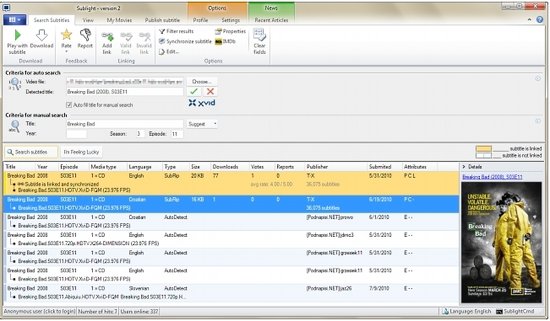
First, simply click on the “choose” button. Doing this will open a dialog box and allow you to select your video. After you have browsed and selected the video you wish to subtitle, click on the “search subtitles” button. Sublight will then spend a few minutes searching for the subtitles to the movie you have selected. Once located; double click on the subtitle format that best suits you. This will launch the video player and Sublight will automatically load the selected subtitle format. It is recommended, however, that you choose a subtitle format which has the tag, “subtitle is linked and synchronized”. if, in the event, this tag is not available; right clicking the mouse will give you other options.
Also check out Subtitle Workshop, Subtitle Edit, and add subtitles to YouTube videos.
To use the auto search option in this free subtitle finder, click on the “Subtitles Search” button and then ‘Choose’ Sublight will search for movie subtitles and when the video title is detected, you have a choice of clicking on two buttons. One indicates the movie’s title is correct and the other indicates the movie’s title is incorrect. If you find that the movie’s title is incorrect; delete it and perform a manual search. Manual searches are performed from the aforementioned ‘subtitle search’ button. Simply enter the movie’s title (you may also enter additional information in order to speed up the search process), click the “subtitle search’”, once again. Double clicking on this button will, as mentioned above, activate the video player. When a subtitle have been located, double clicking on it will save it to your hard disk.
This free subtitle software application also has an array of options that, it is hoped, will make your subtitling searches and your use of the program a lot more interesting. Two of these options are:
- Linked subtitles – these are subtitles that are linked and synchronized with another Sublight user.
- Creating New Links – if you find a subtitle format which is not synchronized with the video, you may return it to Sublight and load a new set of subtitles. If the next subtitle is synchronized, you may right click on the subtitle and create a new link for that video. This newly created link will become the default subtitle track for others that may request the same movie.
As mentioned, the above are just two of many options the program has in order to help all users download and synchronize the best subtitles to any movie. Free Sublight is only available for Windows operating systems – versions 2000 through to the most recent, Windows 7.
Download Sublight Subtitle downloader free.
