S10 RedEyes is a free red eye remover that removes red-eye from digital photos. Indeed this free red-eye remover program will enable you to make your digital photos look professional. The creators of S10 Red Eyes believe the program will enhance your photos giving them a more natural and realistic look.
How to Remove Red Eyes:
S10 RedEyes, unlike other similar programs, uses a circular selection area to pin-point red-eye. This makes it a much more natural operation. With a circular selection option, you are able to fit the shape of the red eye so much easier. To fix red eyes on your photos, simply open the photo within the program, click ‘red eye’ and the ‘fix red eyes’ window will pop up with an enlarged image of the eyes. You then click and hold the mouse over the area you want to fix.
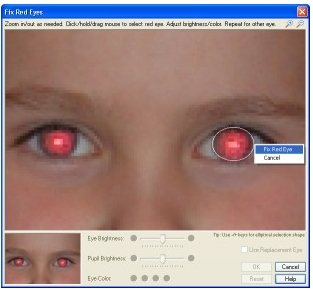
The program will then automatically erase the redness, leaving a clear image of how the eyes should look. It is important to have the program in ‘Fix Red Eyes’ mode when you open the photo.
S10 RedEyes also performs a smooth redness removal through pixel blending along the selected area. This keeps the photo’s color uniform and natural. Other programs available over the Net, do not have this particular technology and after removing red-eye, there is a distinct color or contrast difference. S10 RedEyes also allows you to adjust eye color and brightness, for those who want to enhance the eyes even more. Brightness can be adjusted in two ways; that is to say, you are able to brighten the pupil and leave the whiteness around the eye untouched, or brighten the whiteness and leave the pupil. Initially the eye may have a grey appearance, however you are able to adjust this by specifying the correct eye color of green, blue or brown.
Note: Red eye removal is a standard feature of many photo editing software, like Picasa. So, if you are already using one of these, you don’t need to separately download this free red eye removal software.
In situations where the camera’s flash has completely wiped out the eye structure or left uneven bright and dark patches, you are able to take advantage of S10 RedEye’s option of ‘Use Replacement Eyes’. This option will insert ‘new’ eyes into the photo and allow you to adjust brightness and color. With this particular option, all those photos that you thought were no good, can be repaired and saved.
S10 Red Eyes not only repairs red-eye in photos, but also has all the other features and functions of a standard photo editor. Indeed you are able to rotate images, create thumbnails, crop photos, resize images and so forth. In fact, this free software is able to perform all photo editing tasks.
The navigation toolbar is designed to easily guide you through each window of this red-eye remover, including navigating through all the images in your photo folder. S10 Red Eyes is compatible with Jpeg, BMP, PNG and Gif image extensions.
For those times when you want to print a photo or some other image, S10 RedEyes makes it a simple process. The free red eye remover pops up a preview window that allows you to see exactly how the photo will look after printing. Within this window, you are able to make adjustments, prior to clicking on “print”.
As mentioned above, the most commonly used file formats are supported by this free photo editor. When saving an image, you are able to change the file extension if you click on the ‘Save/Quality’ option.
This free easy-to-use software is void of any embedded spyware, adware, Trojans or malware, making S10 RedEyes an absolutely save program to install on your computer. The added security measure of having both the package and executable file digitally signed by S10 software, guarantees security for down loaders. The program is also compact and will not, in any way, affect other programs running on your computer at the same time. The download is a mere 263 KB much less than other programs in the same class.
S10 RedEyes comes from the makers of S10 WebAlbums. Download S10 RedEyes free here.
