Windows Service Installer is a free system utility that helps in easy installation and uninstallation of any windows service. The free Windows service manager is available for free and is very useful for people using different windows services. The software comes with the feature to allow you to install or uninstall a particular software from the program window itself. The only advantage of using this software as compared to the in-built windows installer-uninstaller is the simplicity where you can just browse the setup/installer on your system and click on the installation button.

Installation of Windows Service Installer
The installation process is as easy as any other windows software. You need to go here where you need to click on the download option and an .exe file will be downloaded. The next step is to click on the .exe file which would initiate the installation process guided by its step by step process. This process will take less than five minutes and as soon as the free system utility is installed you can start with your windows service installation or uninstallation process. If you are looking for a simple software that can help you to manage all your installed apps, you can try Soft2Base, Comodo Programs Manager and Tiles reviewed by us.
Interface of Windows Service Installer
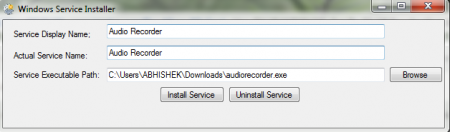
The interface of this free Windows service manager is small and very straightforward. There are very less options present on the screen of the software. The software is not very stylish and has been made to be very user friendly. Even a novice can start working on it without facing any difficulties.
Using Windows Service Installer
The moment the free system utility gets launched you would see a few simple options on it where it would seem similar to a explorer window of your system. To use this free Windows service manager, it is very important to know the services that you need to install and uninstall. In the “service display name” area you need to enter the name of the windows service that you are going to install or uninstall. Here you can give any name according to your wish. Whereas in “Actual service name” area you need to enter the actual name of the windows service and you need to enter the exact name of the program or executable file you wish to install/uninstall.
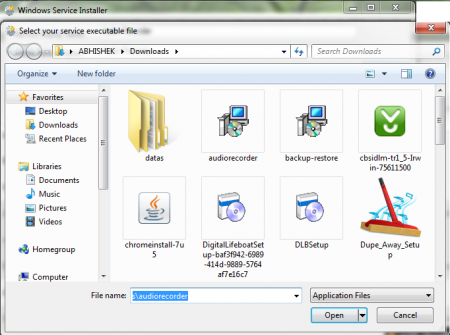
Then in the “service executable path” area you need to enter the path through which you will execute the function. You can browse through different drives in your computer and select the path where the windows service is located. Finally you have two options, one is “install service” and the other is “uninstall service.” If you want to install any windows service then click on install service and if your going to uninstall any service then click on uninstall service option. This is pretty easy and makes the process of installation and uninstallation faster and simpler. Download Windows Service installer/ uninstaller free.
