Undo Close is a free software which allows you to open the recently closed folders or applications on your system in a blink. This utility software fits in to your system tray and works from there itself. It monitors the closed folders and applications on your system and shows you the closed folder name, folder path, application name and application path.
Undo close folders and applications on your system in a blink just by pressing the hotkey assigned. Hot keys assigned are Ctrl+Shift+F for opening closed folder and Ctrl+Shift+A for opening closed application. You can use these hotkeys multiple times for opening applications or folders that were recently closed. Suppose if you closed notepad, window media player and internet explorer, simple press the hotkey Ctrl+Shift+A three times, you will come across all these three applications again.
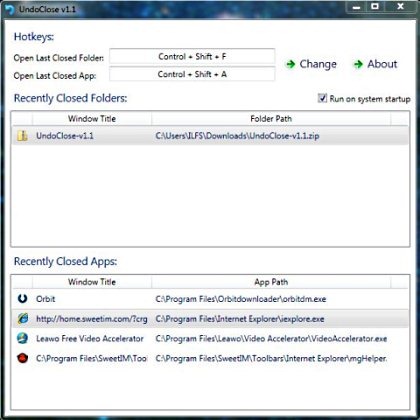
This utility software cuts the time taken for launching any closed application or closed folder again by pressing hotkey. This utility software would have been better if it actually allowed users to change the default hotkey. It includes a change button opposite to hotkeys, but clicking on the change button makes nothing happen, it just shows a fool message as “The App and Folder hotkey was successfully changed”.
Don’t forget to check out Easeus deleted file recovery tool reviewed by us.
Some Key Features Of Undo Close:
- Entirely free software.
- Easy to use with straight forward functionality.
- Hotkey functionality.
- Open closed folders and applications in a blink.
- Shows recently closed folder path and application path.
- Make it run on system start-up.
How To Download And Install Undo Close:
- Visit the addictivetips page of Undo Close.
- Click the “Download Undo Close” link.
- A zip file gets downloaded into your system.
- Unzip the zip format file using ZipGenius and run the undo close application.
Undo Close offers the best and easiest way to open the recently closed folders and applications just the same way your recently closed tab on the browser. Try this software for free.
