XMind is an open source mind mapping software which helps you to create professional mind maps effortlessly in no time. This free mind mapping software is professional, however easy to use, suitable for even the beginners.
XMind comes with several pre-loaded templates and themes to choose for creating professional looking mind maps. You are allowed to try any of these available themes or templates for creating your mind maps in a professional way.
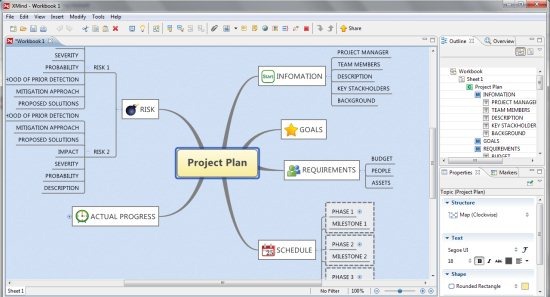
If you have got a mind full of ideas and thoughts and if you are finding it difficult to organize them, then I would suggest you to go with XMind. As it let’s you create a visual representation of all your ideas and thoughts to organize them in the best possible way.
The user-interface is straight-forward, as it includes a toolbar, main drawing area, right section of the screen includes outline window, overview window, properties window and Markers window.
The drawing section let’s you draw multiple mind maps together, as they are displayed in the tabbed format, so you can easily switch between tabs representing different mind maps.
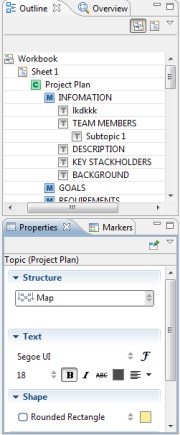
Outline window basically shows you an outline view of your complete mind map, and you are even allowed to edit the name of main topic, topics, and sub topics from within this window. Overview window comes with small overview of your complete mind map and rectangular frame to magnify any part of your mind map. Properties window shows you different options for the entire worksheet and a particular topic or sub-topic. For the Entire worksheet, this window let’s you choose background, wallpaper, legend, etc. For a particular topic or sub-topic, it displays options like structure, text, shape, and line.
Markers window lets you add markers to your mind maps to specify priority, progress, feeling, etc. In addition, you are even allowed to add hyperlinks, notes, etc, to your mind maps for making it more professional and informative.
As I mentioned earlier, that you are allowed to use any of the available templates and themes for creating mind maps. But if you are professional enough to create your own mind map right from the scratch, then it’s possible. Just click the File option and select New Blank Map. Try XMind for free in order to create professional mind maps of ideas and thoughts that hit your mind.
Also check out other free mind mapping software like FreePlane, FreeMind, Edraw Mind Map and The Brain to create mind maps.
Features Of XMind Mind Mapping Software:
- Open source and easy to use mind mapping tool.
- Pre-loaded templates and themes to use.
- Includes spell checker to check spellings.
- Add markers, attachments, notes, images, audio notes, hyperlinks etc, to your mind map.
- Choose the structure, text type, text size, etc to be used in topics and subtopics from the available ones.
How To Get started With XMind Mind Mapping Software:
- Download and install XMind on your computer and launch it.
- A window full of templates and themes pops-up.
- If you are beginner, you should choose any of the pre-loaded template or theme for drawing professional looking mind maps.
- Now, the selected template or theme will appear within the drawing area.
- Simply double-click to edit the main topic and any of the topic or sub-topic.
- For adding subtopics to a topic, simply right click the respective topic and place the mouse cursor on the insert option, and choose to add subtopic and various other elements.
- From the properties window, you can change the structure of diagram, choose the text type, font style, size, etc.
- From the markings window, you can add markings to your diagram.
- In this way, you can create a professional looking mind map effortlessly.
XMind is a professional, yet simple and easy to use mind mapping software which let’s you create professional looking mind maps easily. Download and try XMind to visualize your ideas and thoughts.
