Flowkeeper is a free desktop timer software used to keep up the flow of your work by utilizing pomodoro technique. Flowkeeper is free to download and use.
Managing your work and maintaining the same flow continuously for a long time can be quiet tedious especially in the present world where distractions are huge. However here comes Flowkeeper to help you achieve the regularity and flow at your work. You can manage your work on time once you start to use this software. People interested to try some more timer software can try Cool Timer, Timerrr and Easy Timer.
Features of this free desktop timer
Flowkeeper uses the pomodoro technique developed by Francesco Cirillo in the late 1980s to keep your work running smooth. Flowkeeper with its features makes sure you are efficient at your work.
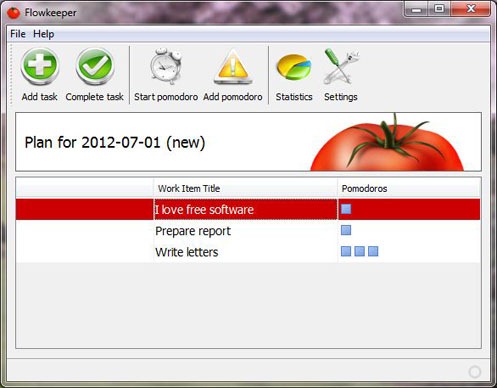
- Daily plans: You can add your various tasks or works to the daily plan. On a new day you can start afresh with the old plan still accessible. You can also choose to delete old plans which are of no further use.
- Highly customizable timers: You can specify your own work and rest time. Although according to pomodoro technique 25 minutes of work followed by 5 minutes of rest is ideal and that is the default timer data set in Flowkeeper.
- Logging various data: Flowkeeper records stats with regard to pomodoros. At any time Flowkeeper can produce the stats which are grouped as Total, Planned, Unplanned, Completed, failed pomodoros etc.,
- Auto updatable: Flowkeeper continuously checks for any updates and applies the updates when an update is available.
How to use Flowkeeper?
Here is short and simple step by step guide on how to use Flowkeeper to maximize your performance at work.
- Decide and plan the tasks you wish to carry out. Once planned add the tasks and choose the approximate number of pomodoros (25 minute periods) you think within which you can complete that task. No problems if you are wrong at predicting! You can add pomodoros later too.
- Once tasks are added and you are ready to work start the pomodoro in Flowkeeper and start doing the work.
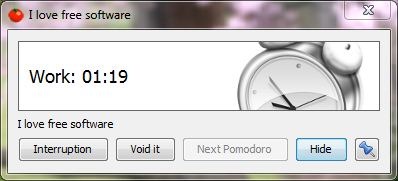
- Flowkeeper’s timer ticks as shown above and rings when the pomodoro (25 minute period) is over. Then take rest for 5 minutes.
- After rest again continue the work by starting the next scheduled or planed pomodoro.
- If you had to face any interruptions while working you can add that too with the reason for interruption and Flowkeeper will stop the timer.
- Once the task is complete, make sure you click the complete task button.
Flowkeeper is a simple and compact application. It installs smoothly and works very well without any problems. The user interface is kept very simple and straight forward. Flowkeeper has a wide range of use right from office workers to students to home makers. Give it a try you are sure to be impressed.
