Pixlr is a free online photo editor which allows you to remove watermark from images like a breeze. Pixlr is basically an online photo editor with powerful photo editing tools. One of it’s main feature is to remove watermark. This Online service consists of several user-friendly tools like drawing tool, sponge tool, clone stamp tool, gradient tool, color replace tool, smudge tool, dodge tool, red-eye reduction tool and many more. Clone stamp tool is the one which helps to remove watermark from an image.
Note from the Editor: After yesterdays goof-up :) on the watermark removing software, we were determined to find a free way to remove watermark from images. This is our way of saying that we do take our work very seriously. So here we go with a absolutely FREE way to remove watermark from images online.

Removing a watermark is not an easy task, it takes time, and at times, you may get irate just because you are not getting proper results. Pixlr is one of the most simple online tool to remove watermarks. It basically colors the watermarks and makes it mix up with the background color in such a way that it is not visible. Moreover, this online photo editor includes various other option like Edit, image, layer, adjustment, filter, view, etc. for processing an image. Image can also be opened in this online tool through image URL.
Don’t forget to check out Watermarking software for free.
Some Key Features of Pixlr To Remove Watermark:
- Easy to use online photo editor.
- Removes Watermarks in an easier way.
- Available in multiple languages.
- No download or installation required.
- Can be used without any registration.
- Several User-friendly photos editing tools.
Also, check out free software to add watermark to images.
How To Use Pixlr To Remove Watermark:
- Open this Online photo editor on your browser.
- Click on the “File” option and open a watermarked image from your computer, image URL, or from the Pixlr library.
- Click “clone stamp tool” from tools window.
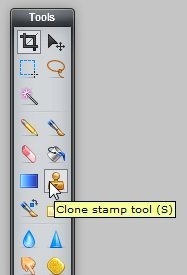
- A circular icon will appear on the screen.

- Press Ctrl button and left click on the color from the image which you want to use in overwriting the Watermark to make it invisible.
- Now place the icon on the watermark and left click to see the magic.
The same process can be followed to remove watermark from images using GIMP and Adobe Photoshop.
Pixlr is one of the best online photo editor with powerful photo editing tools and moreover helps you to remove watermarks like a breeze. Try this out for free.
