Code compare is an innovative visual file comparison freeware that can be used to compare different source code files. The file and folder comparison tool of the Code compare software introduces a new way to examine and identify the differences between the source code files.
Advanced comparison approaches in Code compare, make it possible to identify subtle variations in different programming styles and language based differences in the source codes. The user can compare and merge the two different pieces of source code/ files after analyzing them for differences. This freeware enables visual comparison of codes and files to identify the differences. Other visual code comparison software we reviewed earlier include DiffMerge, AptDiff, and Diffuse.
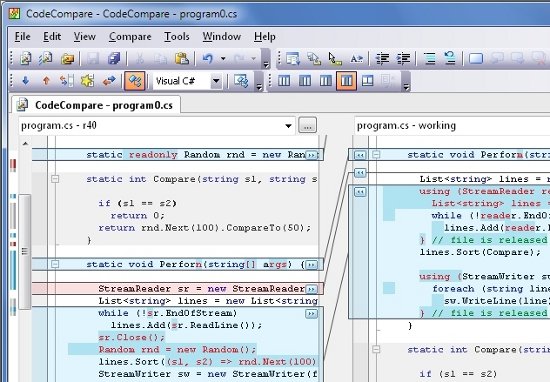
Features of this free visual file comparison software:
The prominent features of Code compare are:
- Visual Studio integration: Code compare has the Visual Studio editor embedded on it for text editing. Features like code assist, code highlighting, breakpoints and bookmarks make, editing of the code are simple. Also check out QuickSharp, and Webbo.
- Code and Structure comparison: Code Compare can analyse the structure and the presence of classes, structures, methods etc., Structure comparison can be performed on codes written in C#, C++ , VB and JavaScript. The software can also process text files of different types written in different languages to compare them. Links between the blocks in these text files help to identify the variations easily.
- Difference Explorer: Difference Explorer uses a unique color coding scheme to denote the changes and revisions made to the code. Marking changes by colors and a tree like hierarchical structure makes it easy for the user to perform code review.
- Code merging: Code merging feature of the Code Compare makes it possible to merge the differences between 2 or more files. Merging can be done easily with the help of shortcuts and Hot keys.
- Folder Synchronization: This feature helps the user to compare the contents of two or more folders. Folders can be opened in the compare zone and the differences in the contents are indicated clearly.
- Source code Integration: Code compare can be easily integrated into any external comparators.
- Further, two-way/ three-way comparison, two-way/ three-way merging, syntax highlighting, code folding, inline changes, Unicode support, lexical comparison are some of the other features that the software boasts of.
All these features and an intuitive interface make the Code compare,a feature rich software to visually analyze and compare source codes. Visual code comparison and Visual file comparison helps in identifying the differences effortlessly.
Code compare requires .NET framework (3.5 or 4.0) to be installed in order to run on the system. It sizes just about 8 MB and can be downloaded from here.
