Auto Hide Mouse Cursor is a free software for Windows to automatically hide mouse cursor. This free software is small in size and includes a clean and simple user-interface. With the help of adjustable timer, you can adjust the time to automatically hide mouse cursor. You can easily adjust the time to hide mouse cursor by dragging the slider and maximum time that you can set is of 100 seconds. It means that if you are not using the mouse for 100 seconds, your mouse cursor will automatically disappear.
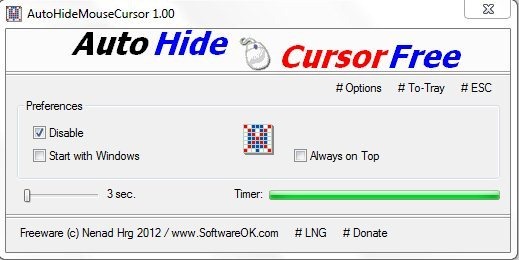
It’s very irritating when you type text and the mouse cursor comes in the way. So with the help of this software when you work on word processing programs, you can hide mouse cursor for working without any kind of mess up. This software interface includes a mouse timer bar which declines when the mouse is idol. This windows utility software functions from the system tray. You can easily disable this software from hiding mouse cursor by checking the “Disable” option.
Don’t forget to check out Real World Cursor reviewed by us.
Some Key Features Of Auto Hide Mouse Cursor:
- Windows utility software.
- Easy to use and functions from the system tray.
- Small in size and less CPU usage.
- Adjust the time to automatically hide the mouse cursor.
- Portable software.
- Allow it to start with Windows start-up.
- Check “Always on Top” option to keep this software on top of every screen.
- No installation required.
You would also like to check out free software to get custom cursor.
How To Download And Install Auto Hide Mouse Cursor:
- Go on to the homepage of Auto Hide Mouse Cursor and click the download link.
- A zip format file of this free software will be downloaded into your system.
- Unzip the zip format file and run the application.
Auto hide mouse cursor is one of the best and easy to use software to hide mouse cursor effortlessly. Download it for free.
