Mute Tab is a Chrome extension which allows you to mute tab sounds on your Google Chrome. This Chrome extension allows you to mute current tab, other tabs or all tabs. With the help of this Chrome extension you can even close tabs or restore tabs with a single click on their respective options. You can mute tab either by clicking on the extension icon or by right-click context menu. With a single left click on the extension icon it shows you all the tabs possibly making sounds. So you can directly view the tabs making sound and mute them from there itself.
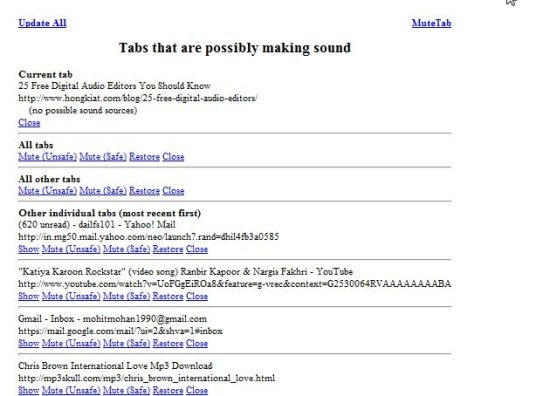
This extension is really very helpful when you are working on multiple tabs because suddenly when you hear a sound, it’s not possible to make out that from which tab is it coming. So With the help of this Chrome extension you can easily mute tab. This extension includes 2 options to mute tab which are Mute (unsafe) and Mute (safe). Mute unsafe basically does not affect the HTML coding of a website, so its better to use Mute (unsafe).
You would also like to check out 5 Google Plus Chrome extension.
Some Key Features Of Mute Tab:
- Easily mute tab sounds.
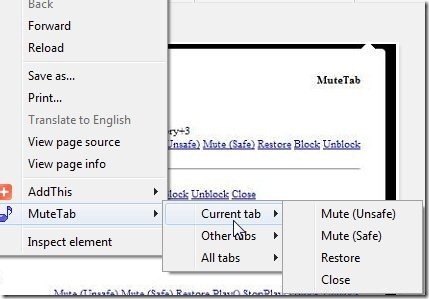
- Mute tab sounds either by clicking on this extension icon or from the right-click context menu.
- Close or restore tabs.
- Track down from which tab the sound is coming.
- Use Mute (safe) or Mute (unsafe) option for muting tab sounds.
- Include other customization options.

Don’t miss to check out Google Chrome Screen capture extensions.
How To Install Mute Tab:
- Go on to the Chrome webstore page of Mute Tab.
- Click the “Add To Chrome” button.
- Now, click the “Install” button in the installation confirmation window.
- Restart your Google Chrome.
- Now click the extension icon and click the respective option or just right-click anywhere on the page and choose the “Mute Tab” option.
Mute Tab, as the name itself suggests that this extension is made for muting sounds or music being played on any of the open tabs. Click here to Install Mute tab in your Google Chrome for free.
