Context is a free Chrome extension that helps you to manage all Chrome extensions, apps and themes. This extension basically allows you to sort extensions into groups so you can easily switch between them.
If your browser is filled with too many extensions and apps, it can waste a lot of space and system resources. But that doesn’t mean that you have to disable all of them. You just have to use only those which are actually being used. So, if you are confused how to do that, Context is here to help you. This Chrome extensions manager can help you to manage all the Chrome themes, apps and extensions.
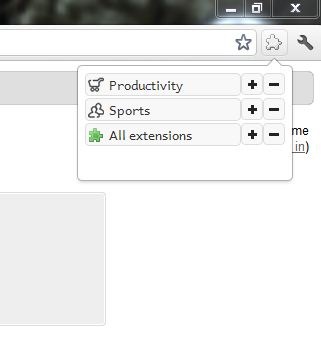
Features of Context
- Group your extensions: Using Context you can group all your extensions into various categories like work, fun, security, shopping, sports, socializing etc. Once all your extensions are grouped you can enable or disable all the extensions in a group with a single click!
- Group your apps: From the options window just enable support to apps, and you can manage apps also the same way as you manage your extensions.
- Themes: You can associate themes to the created groups and thereby you can change themes as you change the groups! But only the last 3 themes are supported for the change.

- Flexible: Context is flexible to use. Just drag and drop them to add to groups. From the browser window itself you can enable or disable extensions! No need to go to the settings page. And whenever you add new extension or app Context will ask you to add to a group through a popup notification window.
- Import/Export: Easily you can import or export Context settings.
- First run tutorial: If you are new to Context you need not spend time learning about it! As soon as you add Context to Chrome, it introduces its features in a step by step tutorial.
If you want to check out some more interesting free Chrome extension like this, you can try Time Stats, Lock Tab and Stylebot Chrome reviewed by us.
Context is a simple and straight forward extension. This free Chrome extension adds smoothly to Chrome and works perfectly to optimize your extensions. You can use this Chrome extensions manager to enjoy smooth internet browsing experience. Test run was smooth without hiccups. It is highly recommended for all internet users to manage all Chrome extensions easily. Download Context!
