Now everybody can access Google+, no more invitational havoc to Google+. Yea..Yea, I know most of you already knew this. With Google+ open to all, you would definitely want to move on permanently and some of you might already have. Hence, when it comes to transfer data to Google+, the very first thing strikes into your mind is “transferring photos to Google+ album”.
To do so, usually you download all your Facebook photos to Picasa and thereafter, individually upload them to Google+. I am quite confirmed you must be knowing that Google+ is integrated with Picasa. Hence, you spend hours to download photos to Picasa and again upload them to Google+. This is where this new Extension for Google Chrome: Move Your Photos comes into existence.
The extension enables you share Facebook albums or some selected photos to Google’s Picasa, thereby sharing them with your Circle in Google+. No need to upload them time and again.
How To Use Chrome Extension: Move Your Photos
- Once installed, Click on the Move Your Photos icon, orange bus like icon
- Click on “Login with Facebook” link, appears just below Move Your Photos icon

- Click on “Allow” button to allow “Move Your Photos” have access to your Facebook Account. You will be prompted to Login quickly if your are not.
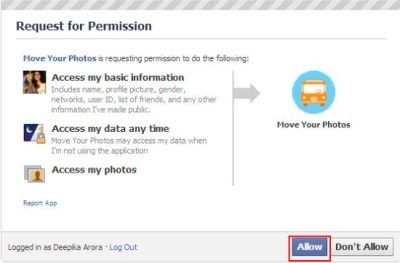
- You will soon be taken to a webpage where all your Facebook albums are listed. If you want to transfer all your Facebook Albums, check “Upload All” option given at the top of every single album. You can also select the photos or albums you want to transfer.

- Once selected, Click on “Upload” button given at the bottom of the page.
- Yup..All your selected photos will start uploading and a progress bar will appear at the bottom right side of the page.
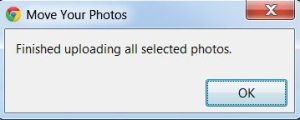
- As soon as all your selected photos get uploaded, you will receive a message box. Click on “OK” to confirm
Now, to see all the transferred photos, sign in to your Picasa Web Albums. Start sharing with Google+.
How To Install Move Your Photos: Google Extension
- Go onto the chrome extensions website and search for Move Your Photos or click the website linked below.
- Click on “Add To Chrome”
- Click on “Install”
In next couple of seconds, you will find Move Your Photos installed as orange bus like icon right next to the URL bar.
You can also download any of the given software to Download Complete Picasa Web Albums quickly.
This excellent Google Extension: Move Your Photos is the fastest way to transfer pictures from Facebook to Google+. However, Picasa provides 1GB storage service, hence, you need to choose the ones you want to transfer if you have large bunch of pictures on Facebook. Nevertheless, 1GB is quite a good storage service and it can upload a decent number of pictures. So go ahead and quickly move your Facebook Photos to Google+.
