• Home
  • Software Testing Service
  • About US
    • Privacy Policy
    • Disclosure
  • Write For Us
  • Submit Software
  • Contact Us
    • Subscribe
I Love Free Software
Best free software available all over the web. The free software categories include Windows Software, Social Networking Tools, and software installation videos.


  • Featured
  • Windows
  • Web Applications
  • App Store
  • Android
  • iPhone
  • iPad
  • Windows 8
  • Social Networking
  • Programming Tools

Convert PowerPoint to Video with RZ PowerPoint Converter

By Ganesh on April 26, 2012 | Sponsored Links

RZ PowerPoint converter is a free PowerPoint Converter using which you can convert any PowerPoint file into a video file with just a click of a button.

Don’t worry if you can’t find a PowerPoint installed where you have to present your ideas. RZ PowerPoint is there to help you out! Convert those PowerPoint files to a more readily accessible video files and you can go ahead with your presentation.

What you can convert to what?

Using RZ PowerPoint Converter you can convert all the versions of PowerPoint like:

  • PowerPoint 2010, 2007, 2003, 2002 and 2000

It supports all PowerPoint formats like

  • .ppt, .pptx, .pptm, .pps, .ppsx, .pot, .potx, .potm

You can convert them to:

  • General video formats
  • HD video formats
  • Mobile phone video formats
  • Formats which can be played in your iPod, iPhone, AppleTV, Sony Walkman or Xbox
  • Facebook compatible formats

All these are just a click away and within minutes you are ready to go ahead with your presentation!
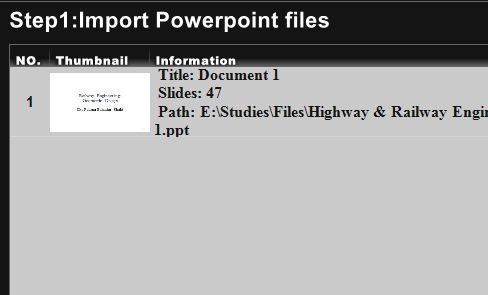
RZ PowerPoint Converter File to Convert
Sponsored Links

How to convert?

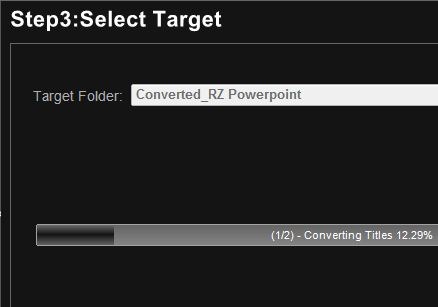
Conversion is quick and simple yet it is good and efficient. Just add the presentation you wish to convert. Choose the format of the video to which it is to be converted and also the time between slides. Go ahead and choose the target folder and you are ready to start the conversion. Just press start button and the conversion begins. The output is in the folder you chose!
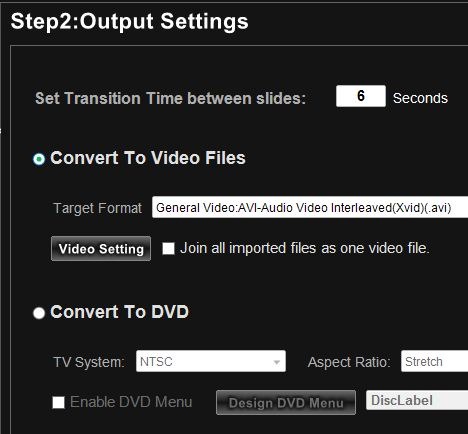
RZ PowerPoint Converter Settings

RZ PowerPoint Converter Converting

The user interface is very simple and the software guides the user step by step into the conversion process. Even one with ordinary knowledge on conversion is sure to be at ease while converting. The various buttons are placed at convenient locations from where they can be easily accessed.

Installation & System Requirements

The software installation doesn’t pose any problem at all! Simple guide guides you through the installation process which completes smoothly and at the end you are ready to convert presentations. The minimum system requirements are:

  • Windows XP/Vista (32 bit and 64 bit)/7 (32 bit and 64 bit)
  • VGA Card & DirectX 9 or higher

When tested the software converted presentations at a brisk pace and the output video was excellent. RZ Video Converter is worth a collection for all those officers and students who deal with presentations!

Home Page: Click Here
Works With: Windows XP, Vista, 7
Free / Paid: Free

Link to This Page:


You Might Also Like:

  1. E.M. Free PowerPoint Video Converter: Convert PowerPoint to DVD for Free
  2. Download Free Leawo PowerPoint To Video Converter
  3. PowerDVDPoint Lite: Free PPT to Video Converter
  4. Free Image to Video Converter: Convert Images to Video
  5. AuthorPoint Lite: Convert PowerPoint Presentations to Flash

Be the first to know about Latest Free Software:

  • Join us on Facebook
  • Subscribe to our RSS Feed
  • Follow us on Twitter
  • Subscribe to Email Updates:

Posted in File Converters, Productivity Software | Tagged convert powerpoint to video, powerpoint converter | Leave a response

Ganesh

« Previous Next »

Featured Posts

  • Top 7 Free Launchers for Android
  • 5 Free Snippet Managers To Manage Code Snippets
  • 5 Free Online Tools To Test Website In Different Resolutions
  • 5 Free Microsoft Access Alternatives
  • 5 Free IP Notifier Apps
  • 5 Online Mapping Websites
  • 5 Free Alternatives To iGoogle
  • 7 Websites To Download Windows 8 Themes

Join More than 15,000 Followers!

Enter your Email Address
  • Submit Software
  • Software Testing Service
  • Write For Us
  • About Us
  • Privacy Policy
  • Disclosure
  • Contact Us

Link to Us:

Did we review your software here? Feel free to flaunt this badge on your website:

Free Software

Use this Code:

Copyright © 2013 I Love Free Software.

Powered by WordPress and Hybrid. New - H