YouTube has added an impressive feature which can be applied to your videos in just a few mouse clicks. This feature is the ‘Face Blurring’ feature that can help you to hide or blur faces in your videos. So if you are uploading some content and wish to keep the identity of any individual hidden, then this feature is something which can be quite helpful. This feature is a breeze to use and just requires a couple of mouse clicks.
How to Blur Faces in YouTube videos?
- Make sure that you are logged in to your account and you have already uploaded the video where you wish to use this blur feature.
- Click on your username at the top corner of the window.

Here the username is ‘kritsneek’. As soon as we click it, a drop down menu appears where you need to choose the option ‘Video Manager’.
- Once you click on the ‘Video Manager’, you will see a screen containing a list of all your uploaded videos. Next to the video, you need to click on the arrow next to the edit button. This will display a number of options and you need to click on ‘Enhancement’.

- You can edit the video in the YouTube editor window. However, here we are only interested in face blurring. Click on ‘Additional features’ option and click on ‘apply’ present below the ‘blur all faces’ description.
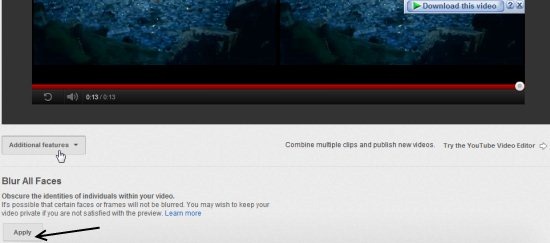
- If you wish to keep the original video, you need to uncheck the button next to ‘Delete the original video’ once ‘apply’ changes to ‘applied’.
Check out YouTube Statistics to track likes, dislikes and views of videos.
Cons
One of the major caveats of this feature is that it fails to blur all the faces. This is quite evident in the snapshot below.
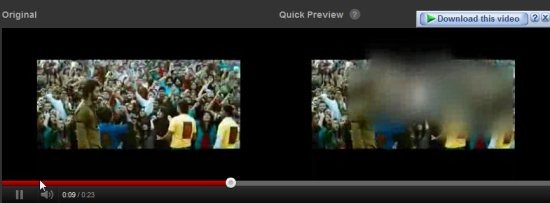
The left video is the original one whereas the right is the preview after we applied ‘blur’. As it’s evident, half of the faces are blurred whereas the feature has failed to blur some of the faces. Hence, it becomes necessary to preview the video after applying this feature to make sure that the result is per your expectations.
Also check out how to watch YouTube videos in TV mode reviewed by us.
Checkout the video we created using this face blur feature:
Verdict
Though the ‘Face Blur’ feature in YouTube suffers from some major limitations, yet it is an impressive feature. You can try it out, it’s simple.
