Aktiv Download Manager is best suited to users who want to start the next download as soon as the previous one ends. If you want to download applications quickly then this software surely meets your needs. By using this application, you can manage your downloads by pausing, cancelling, queuing up or by searching for different downloads. This free download manager comes with some interesting features like dynamic file segmentation, download accelerator, and multipart downloading technology, these help in further enhancing your download process. Aktiv Download Manager successfully reuses all the available connections and does not depend on further connection or login process to provide you with the best download performance.
Installing Aktiv Download Manager
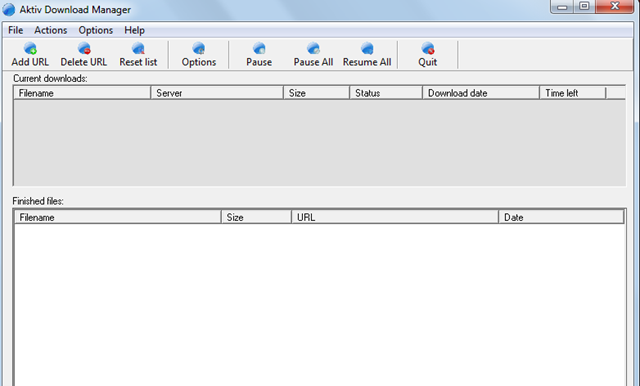
The installation is pretty quick and easy. You just need to click here and Download the Free version. After this a .exe file will be downloaded and you just need to click on run to start the step by step installation process. While the software is being installed you get a popup menu where it tends to change your default search engine and the default homepage. You can remove the check marks from set download energy as my default search engine and from set download energy as my default home page to avoid this. You can start using the software as soon as the download is complete. If you are interested to try some more free download manager, you can try GetGo Download Manager, Fresh Download and Orbit Downloader.
User Interface of Aktiv Download Manager
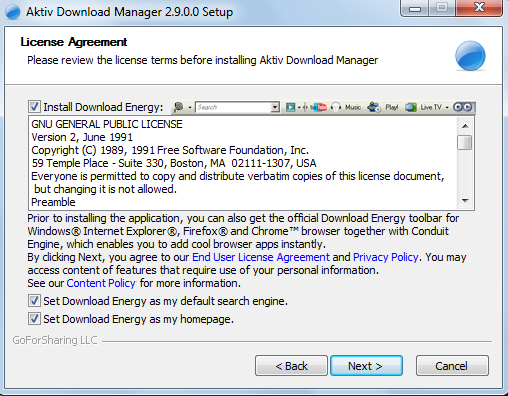
The software comes with a well thought interface which is clean, easy to use and very intuitive. You can have a good control over all the features included in the app and all the functionalities lay just a click away. This is a free tool which enhances the download capabilities of windows by giving it a business like interface. Its interface has been mainly divided into two panes namely finished downloads and current downloads. It is very user friendly and you can easily set the general preferences using the option button. Using the general tab in the option dialog box can integrate the software with your browser.
Some download managers integrate many different utilities with bothersome banners but with Aktiv Download Manager you won’t face these problems. It takes care of all the URls to make it easier for you whether it is a ZIP file or an EXE file. The best part is that its interface has not been overloaded and it only contains the required buttons. This makes it easier to manage your downloads by adding, editing or resetting the download list. This application allows you to optimize and control all the big downloads as much as possible.
Using Aktiv Download Manager
Aktiv Download Manager has the capacity to manage and schedule more than 99 simultaneous downloads. You will surely like the way it handles the download process at great speeds. If the machine is shut down because of any error or a power mishap then you don’t need to start from zero.
The main page of the software has following options:
- Add URL
- Delete URl
- Reset List
- Options
- Pause
- Pause All
- Resume All
- Quit
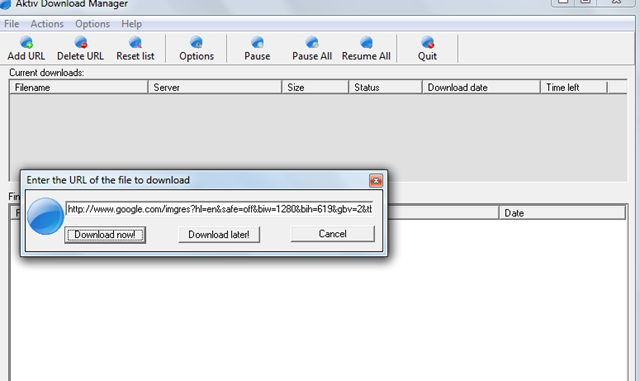
All the tabs are important in their own way. The Add URL will provide you the option to paste the URL through which you want to start the download. If you have copied any URL then you will find a URL already present in the box. While you are copying a URL a popup menu appears which asks you that a URL was found present in the clipboard do you want to download it. It depends on you if you want to download through that URL or not.
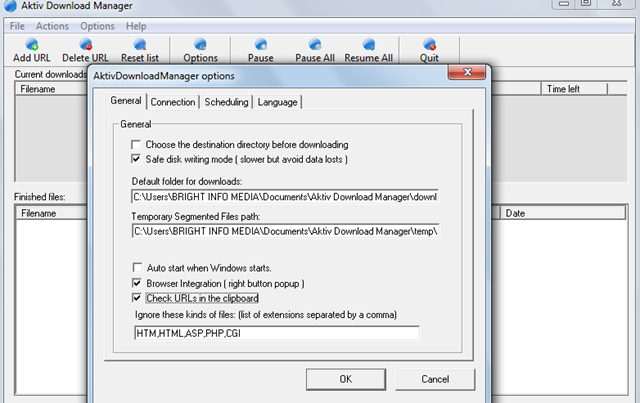
The Delete URL will help you delete already existing URL present in the current downloads or finished files. There is also an option tab which will help you to set General settings like choosing the destination directory, setting browser integration or checking URLs in the clipboard. In the options tab you can schedule your downloads and set the language preference.
The pause, pause all, and resume will help you manage the downloads and you can pause and resume your downloads as per your requirements. The only problem is that this software does not integrate with Firefox properly as compared to internet explorer. But the most important part is that your downloads will not be corrupted if you get disconnected.
