• Home
  • Software Testing Service
  • About US
    • Privacy Policy
    • Disclosure
  • Write For Us
  • Submit Software
  • Contact Us
    • Subscribe
I Love Free Software
Best free software available all over the web. The free software categories include Windows Software, Social Networking Tools, and software installation videos.


  • Featured
  • Windows
  • Web Applications
  • App Store
  • Android
  • iPhone
  • iPad
  • Windows 8
  • Social Networking
  • Programming Tools

Quick Image Viewer and Editor: FreeVimager

By Deepika Arora on September 22, 2011 | Sponsored Links

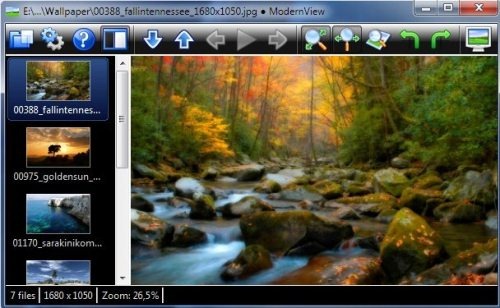
FreeVimager is a free image viewer and editor. It also acts as a converter and slideshow maker for Windows. With this fast image viewer, you can quickly execute avi Video Files, ordinary audio files and audio CDs.

Although there are many image editor software turning out to be same, however, what makes FreeVimager different from others is that it is very small and handy tool. It can also run standalone exe files. It makes image editing very simple and quick.
imageviewer
Sponsored Links

Lets check out some of the key features of FreeVimager:

  • View and edit picture files of different formats like jpeg, bmp, gif, tiff, png, pcx and emf
  • Save as PDF
  • Full-screen multi-monitor support
  • Jpeg lossless rotate and crop
  • Print Preview with image positioning
  • Enables rotating, cropping, resizing, contrasting, etc.
  • Red-eye removal
  • Scan multiple pages to tiff and PDF
  • Avi video player with snapshot functionality
  • Audio and CD player
  • Zip extraction

However, in order to get started with FreeVimager, you need to give a couple of seconds to its download and installation process.

Here is how to Download FreeVimager:

  • Go onto the website
  • Under Main Menu column, Click on “Downloads”
  • Click on “FreeVimager”
  • Click on “01. FreeVimager 3.5.0 Installer with Tutorials”
  • Click on “Download”
  • Double-Click the downloaded link in order to run the software
  • Click on “Run”
  • The installer will automatically install the FreeVimager as you follow the installation steps.

There you are. Here is your faster, better image viewer and editor. Start accessing it. The best part is that this easy-to-use photo editor works well with all Windows, starting from Windows 95 to Windows 7.

You can also view some similar software reviewed by us: Image Editing Tool, and Photo Editing Software.

In short, FreeVimager is a quick photo viewer and editor which is very handy to work on. Go ahead and get this faster image editor right away and view your images quickly.

Home Page: Click Here
Works With: Windows 95 up to Windows 7
Free / Paid: Free

Link to This Page:


You Might Also Like:

  1. Free Vimager: Free Image Viewer, Image Editor
  2. Wildbit Viewer: Free Image Viewer, Slideshow Maker, Image Editor
  3. Free Image Viewer/Editor: JPEGView
  4. Free Lightweight Image Viewer and Editor: Pumas Viewer
  5. FastStone Image Viewer: Free Image Viewer, Manager, Editor, and Converter

Be the first to know about Latest Free Software:

  • Join us on Facebook
  • Subscribe to our RSS Feed
  • Follow us on Twitter
  • Subscribe to Email Updates:

Posted in Image & Photo, Image & Photo Editors, Windows | Tagged avi video player, converter, free image viewer, free photo editing, free photo editing software, Free Vimager, image editing, image editor, image editor software, photo editor, photo viewer, red eye removal | Leave a response

Deepika Arora

« Previous Next »

Featured Posts

  • 5 Free Snippet Managers To Manage Code Snippets
  • 5 Free Online Tools To Test Website In Different Resolutions
  • 5 Free Microsoft Access Alternatives
  • 5 Free IP Notifier Apps
  • 5 Online Mapping Websites
  • 5 Free Alternatives To iGoogle
  • 7 Websites To Download Windows 8 Themes
  • 5 Best Free Calculator Apps For Windows 8

Join More than 15,000 Followers!

Enter your Email Address
  • Submit Software
  • Software Testing Service
  • Write For Us
  • About Us
  • Privacy Policy
  • Disclosure
  • Contact Us

Link to Us:

Did we review your software here? Feel free to flaunt this badge on your website:

Free Software

Use this Code:

Copyright © 2013 I Love Free Software.

Powered by WordPress and Hybrid. New - H