Just Manager is a freeware which is available to serve your needs as a free Windows file manager. It comes with a simple user interface that has some enhanced features to make a difference from the conventional windows explorer which all of us have always used.
Installing Just Manager
Just like any other free Windows Explorer alternative which you might have downloaded from the internet before, you need to visit the developer’s site here and click on the download link available. It is approximately 800 kbs in size, so it would hardly take a minute or two with a decent internet connection. Once you are done downloading the software, run the setup file and install it in the directory you want to.
Using this windows explorer alternative
In order to use this free Windows file manager click on the launch icon button, this would open the file manager window. It opens with two screens, where the left presents you individual drives with all the files and folders. On the right of the window you would see the same options with the drives and the folders. If you are looking for a simple Windows Explorer alternative, you can try Proto, aiFiLE and FileOrganiser.
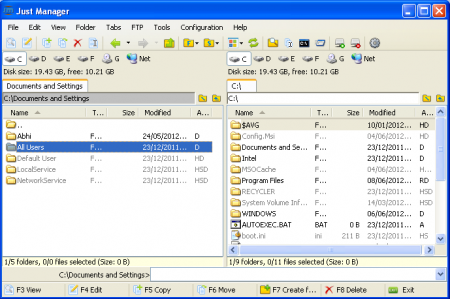
Here you have numerous options to move, copy delete, etc to all the files and folders on your system. You also have several shortcut keys which have been mentioned at the bottom of the window. For example you can press the F3 button if you wish to view a file after clicking on it or if you want to create a new folder just press the F7 button and it would be created in the place you are. At the top there are almost every option which you could use to manage your files and folders present in your system. For a quick shift to another drive the top of the file explorer has the direct links to the drives as per their drive letters.
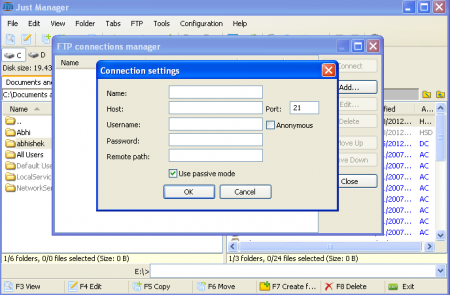
For those of you who use FTP for managing files online this software comes with the FTP manager. To access that you need to click on the FTP tab in the menu bar and select the FTP connection manager from the drop down. This opens up a new popup asking you the credentials of your FTP login. In order to use this feature you need to be connected to your internet.
Some other features worth mentioning are the options to map a network drive, create new tabs, and use the command prompt, etc. Try Just Manager free.
