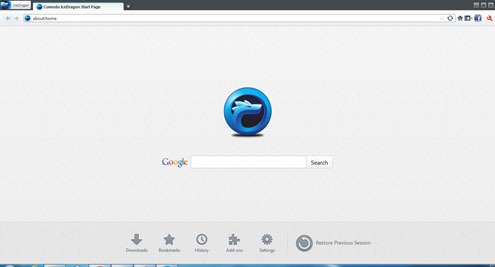
Comodo IceDragon is a secure browser designed and built on the core features of Mozilla. It retains the core functionalities, looks and performance of Mozilla with Comodo’s security features added to it. You can download and use Comodo IceDragon for free!
Internet security is of prime concern for all internet users. Attacks from malicious content in various websites is becoming a household phenomenon. Despite this threat you are also liable to loose your privacy as well as your sensitive information like the login credentials etc. Unauthorized access of data is increasing by the day. You can stay protected from all these just by using Comodo’s IceDragon browser.
Highlights of Comodo IceDragon
- Comodo’s SecureDNS: It is a free and awesome feature that comes in with Comodo IceDragon! With this all malicious websites if you try to visit are automatically detected and blocked. You will be least exposed to DNS Cache Poisoning attacks. With Comodo’s SecureDNS feature enabled your sites will load faster.
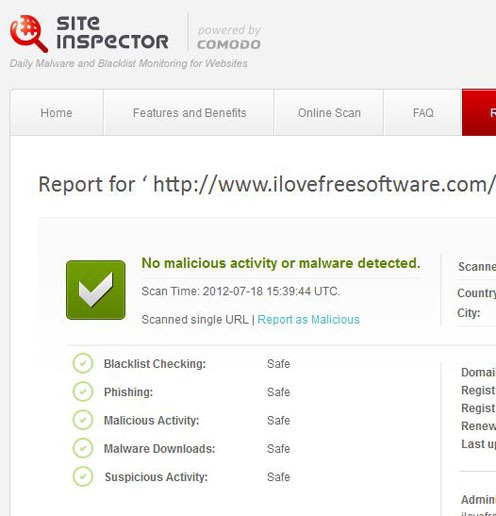
- Site Inspector: You can scan any website for presence of malicious content in it. Comodo IceDragon’s site inspector will scan the website and produce the results for you. The website will be checked for Blacklist, Phishing, Malicious Activity, Malicious Downloads and Suspicious Activity. Some basic information on the site like the IP scanned, domain, registered name, contact details etc., are also reported.
- Social Media Feature: Social networks are the latest trends for anything and everything. With Comodo IceDragon’s Social Media Feature you can share anything in a single click. Just click on the social networking icon in the menu bar and its done!
- Safer, Smarter and Faster: Comodo’s IceDragon is the safe way to browse as it has key security elements embedded in it. With Comodo’s Ice Dragon the websites you visit load faster giving you an amazing online experience.
- Mozilla’s Core Elements Retained: Comodo’s IceDragon is built keeping the core of Mozilla intact. Everything right from the looks to the positions of menus all are kept the same. Hence users can find the convenience and power of Mozilla in Comodo’s IceDragon. This means no time is spent in getting used to a new browser.
You can also check out other free browsers reviewed by us.
Installation Tips
- Comodo’s IceDragon will run in the following platforms
- Windows XP 32 bit & 64 bi
- Windows Vista 32 bit & 64 bit
- Windows 7 32 bit & 64 bit
- If you wish to use Comodo’s SecureDNS feature then you may have to enable it right at the time when you are installing it. It will work in a wide system only.
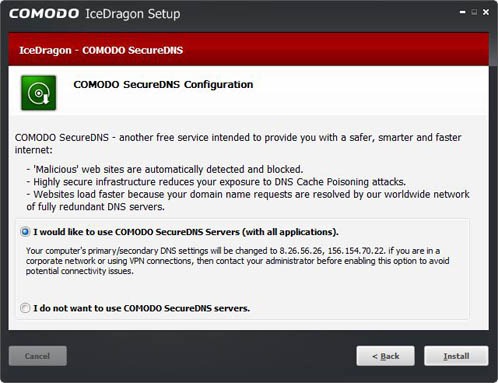
- During installation you can also choose to import settings to Comodo’s IceDragon from Mozilla.
Also checkout waterfox free browser which is a 64-bit version of Firefox.
Comodo’s IceDragon is a new revolution which meets users security requirements as well as their particular browsing necessities. All these features are combined with a sleek looking user interface. No problems in accessing various options and settings as the same Mozilla user interface is retained in Comodo IceDragon too! Test results indicate excellent safe and fast performance without any crashes. Recommended for use by all Internet users this Comodo IceDragon is all set to revolutionize the way people browse!
