PDF XChange Viewer is a free PDF reader that replaces Adobe’s Acrobat Reader and further lets you read PDF files and annotate PDF files. The user-interface is simple, user-friendly and looks similar to the interface of Acrobat Reader. Apart from viewing PDF file, you can even edit PDF files using several edit options displayed in the control panel along the top. It offers edit options like, you can rotate PDF file clockwise or anti-clockwise, fit page to current view, fit page width, zoom in or zoom out PDF files and more.
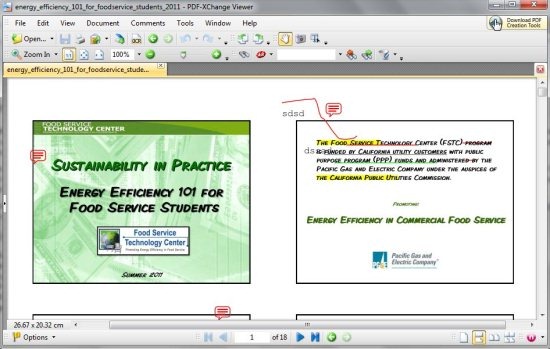
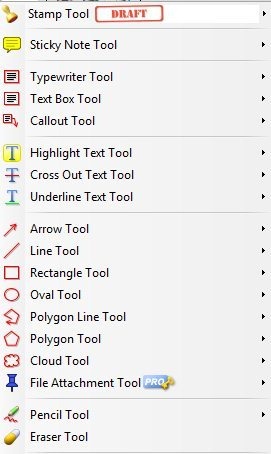
PDF XChange Viewer allows you to annotate PDF files in several ways, as you can highlight text, underline text and cross-out text in PDF file. You can even make use of sticky notes tool for adding sticky notes, typewriter tool for adding text to your PDF file, pencil tool for free hand writing or drawing in your PDF file. This freeware also comes with other mark-up tools/ shapes like rectangle, oval, polygon, cloud, line, etc for making your PDF file attractive.
This freeware has got basic tools like hand tool for dragging PDF file upward, downward, leftward and rightward, snapshot tool for taking snapshots of PDF files, select tool for selecting text in your PDF file. It’s one of the fully packed PDF reader which is suitable for the beginners as well as for the professional users. Try this PDF reader for free.
Also, check out free software to get deleted files back.
Some Key Features Of This Free PDF Reader:
- Comments and Annotations can be easily added to your PDF file.
- Multiple Tabbed document Windows.
- Mark-up PDF document pages with several shapes and objects.
- Directly type text on PDF page with respective options.
- Export text from your PDF document.
- Export PDF page to image.
- Zoom in or Zoom out using slider.
- User-interface can be customized.
- PDF file on Web can be opened by entering the URL.
You would also like to check out free software to schedule emails.
How To Download And Install This Free PDF Reader:
- Visit the homepage of this free PDF viewer and click the “Download” button.
- A Zip file of this PDF viewer will be downloaded into your system.
- Unzip the zip format file and run the application file.
- Follow further step by step easy installation procedure.
PDF XChange Viewer is a smart PDF reader and editor that allows you to read and edit PDF files with several options available on the interface. Download PDF XChange Viewer for free.
