WeeDuplicateDetective is an awesome tool which aids you in finding and deleting duplicate files in your hard disk. This way you can free up lots of space in your hard disk. You can download and use WeeDuplicateDetective absolutely free.
Duplicate file is the copy of a file saved with a different name. Obviously both their contents are the same. Duplicate files can be word files, images, music files, videos archives etc. Thousands of such duplicate files occupy precious space in your hard disk. You can free all of them in just a matter of seconds thanks to WeeDuplicateDetective. Moreover it safely deletes those duplicate files ensuring that the original file is not harmed at all.
Features
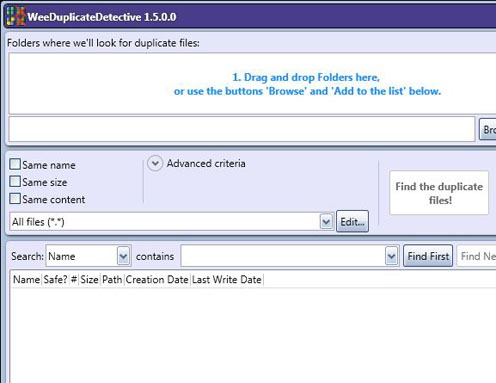
- Multiple folders: Using WeeDuplicateDetective you can scan multiple folders for duplicate files at the same time.
- File filter: You can scan images alone or music files alone or your documents alone. Just add the file type as the filter and WeeDuplicateDetective scans for duplicate files of that type alone.
- Comparison criteria: WeeDuplicateDetective offers best ways of comparing files so that duplicates can be found easily. You can choose to compare files based on their names, size, content, creation time and last modified time.
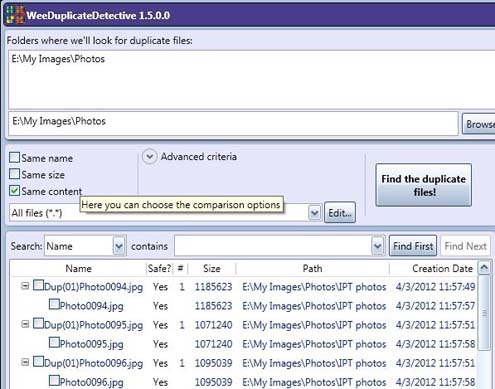
- Statistics: At the end of every scan, WeeDuplicateDetective shows at the bottom of the window what it found in the scan. It shows how many files were scanned, their total size, number of duplicate files found, amount of space that can be freed.
- Deletion: WeeDuplicateDetective offers simple yet effective ways of selecting the duplicate files from the findings list for deleting them. Just check checkboxes and its enough. WeeDuplicateDetective simplifes even that work of yours. You can choose to delete all duplicate files with a single click using WeeDuplicateDetective’s intelligent selection choices.
- Search bar: WeeDuplicateDetective offers this unique search option by virtue of which you can search for files of your choice.
How to find and delete duplicate files
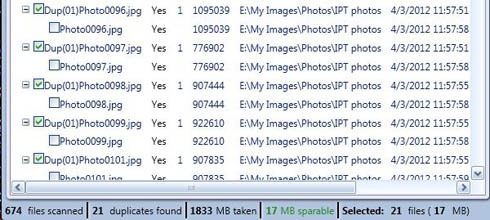
Using WeeDuplicateDetective you can easily find and delete duplicate files within seconds. Just follow the simple five steps.
- Browse for the folders you want to scan and select and add them to WeeDuplicateDetective’s list.
- Next up choose your criteria of finding the duplicate files. You can find duplicates based on content, name, size, time of creation, time of last modification etc. After choosing your criteria you are ready to find the duplicate files.
- Click find duplicate files and WeeDuplicateDetective scans the folders and within a while it draws up a list of duplicate files.
- Select those of which you want to delete by checking check boxes or simply use WeeDuplicateDetective’s intelligent selection ways.
- Delete them easily with a single click. You can choose to delete them permanently or move them to the recycle bin.
WeeDuplicateDetective user interface is simple and cool with all features put together in a simple form. The user interface is designed to self guide the user in finding and deleting the duplicate files. For any further help the application houses a comprehensive help which is sure to put the user at ease. The application installs smoothly without any problems and runs efficiently when tested without any crashes.
You can manage your hard disk space more efficiently with WeeDuplicateDetective. Why don’t you give it a try?
