PDF to SWF Converter 3000 is a free software to convert PDF to SWF files. This free PDF to Flash converter even allows you to add an entire folder that has multiple PDF files for conversion. In that case, it will do a batch PDF to SWF conversion.
PDF to SWF converter 3000 is lightweight and easy to use unlike other similar software, so beginners or novice users can make conversions with just a few clicks. The best part is that it does not even requires Adobe Reader to be installed on your computer.
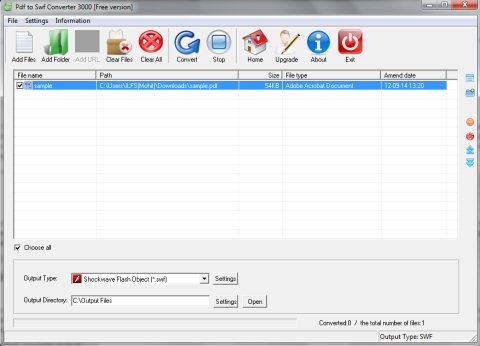
The user interface is easy to understand and comes with a tool bar including options like File, Settings and Information, and other options below the toolbar like Add files, Add folders, Clear files, Clear All, Convert, Stop, Exit, etc.
It even comes with a list which shows you the added files along with their details like file name, path, size, file type, ammend date. This list is followed by options like output type and output directory through which you can choose your desired output directory.
How to Convert PDF to SWF with this Free PDF to SWF Converter:
It is quite easy to convert your PDF files. Just select the files that you want to convert. Then specify the path of the output folder. Then hit the “Convert” button. This PDF to Flash converter will start the PDF to SWF conversion process, and all the converted files will be saved in the output folder you specified. After converting PDF files to SWF files, you can view them in any SWF viewer. The SWF file is shown as a video file, just like a slideshow presentation, which displays different pages within a PDF file one after another.
You may also try some other similar software like Boxoft PDF to flash and Free PDF to Flash SWF for converting PDF to SWF for free.
Features Of PDF to Flash converter:
- User-friendly and easy to understand user interface.
- Add an entire folder for conversion.
- Batch convert PDF to SWF.
- Stop the conversion process with a single click.
- Shows file information like file name, path, size, file type, amend date.
- Desired output file location can be specified.
PDF to SWF Converter is a free PDF to SWF converting software tool that offers an effortless way to convert your PDF to SWF files. Download and try PDF to SWF Converter for free.
