• Home
  • Software Testing Service
  • About US
    • Privacy Policy
    • Disclosure
  • Write For Us
  • Submit Software
  • Contact Us
    • Subscribe
I Love Free Software
Best free software available all over the web. The free software categories include Windows Software, Social Networking Tools, and software installation videos.


  • Featured
  • Windows
  • Web Applications
  • App Store
  • Android
  • iPhone
  • iPad
  • Windows 8
  • Social Networking
  • Programming Tools

Clean Drive – Find and Delete Old Files From Your PC

By Garima on December 18, 2009 | Sponsored Links

Is the speed of your PC slowing down? Do you have too much of old stuff in your PC? Are old files just filling up your hard disk?

If yes, then try this free software Clean Drive that cleans up all your old files and even directories from your PC in an instant.
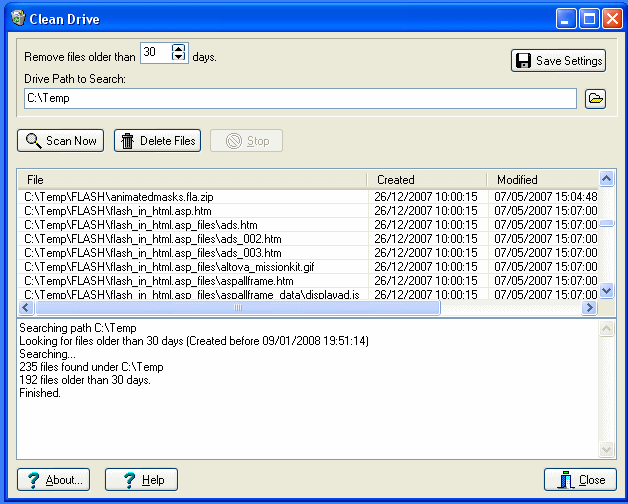
Download Clean Drive Old Files Delete software
Sponsored Links

It is very easy to use. You just have to run the software in your PC and change the number of days your files should be older so that you can delete them accordingly. Then, you  just  have to scan and delete the files.

You can easily find your old stuff, identify them and delete them.

Here are some of the features of this free software to delete old files:

  • Use it via the command prompt and it automatically scans and deletes your old stuff
  • It will show you the files that record its activity like CleanDriveActivity.log tells you what it did and show you the errors if any  and  CleanDriveFiles.csv shows you the list of files matching your search
  • You can run it through the graphical user interface as well
  • Cleans up the files as well as the empty directories

So, if you never got the time to delete the leftover stuff from your PC, do it now with Clean Drive which makes it quite simple for you and saves your time and efforts. A word of caution – we did not find an option in Clean Drive to select files of a specific type. So, you might end up deleting even those files that you did not want to delete. Check the results of scan carefully before deleting any file. You might also try Duplicate Cleaner that identifies Duplicate Files on your disk, and lets you delete them. Another interesting software that I like is Free Disk Usage Analyzer that shows me the largest files on my PC so that I can see exactly which files are taking most of my disk space.

Home Page: Click Here
Works With: Windows
Free / Paid: Free

Link to This Page:


No related posts.

Be the first to know about Latest Free Software:

  • Join us on Facebook
  • Subscribe to our RSS Feed
  • Follow us on Twitter
  • Subscribe to Email Updates:

Posted in System Utilities, Windows | Tagged clean drive, delete empty directories, delete old files, download clean drive, find empty directories, find old files | Leave a response

Garima

« Previous Next »

Featured Posts

  • 5 Apps For Windows 8 To Record Sound
  • Top 7 Free Launchers for Android
  • 5 Free Snippet Managers To Manage Code Snippets
  • 5 Free Online Tools To Test Website In Different Resolutions
  • 5 Free Microsoft Access Alternatives
  • 5 Free IP Notifier Apps
  • 5 Online Mapping Websites
  • 5 Free Alternatives To iGoogle

Join More than 15,000 Followers!

Enter your Email Address
  • Submit Software
  • Software Testing Service
  • Write For Us
  • About Us
  • Privacy Policy
  • Disclosure
  • Contact Us

Link to Us:

Did we review your software here? Feel free to flaunt this badge on your website:

Free Software

Use this Code:

Copyright © 2013 I Love Free Software.

Powered by WordPress and Hybrid. New - H