• Home
  • Software Testing Service
  • About US
    • Privacy Policy
    • Disclosure
  • Write For Us
  • Submit Software
  • Contact Us
    • Subscribe
I Love Free Software
Best free software available all over the web. The free software categories include Windows Software, Social Networking Tools, and software installation videos.


  • Featured
  • Windows
  • Web Applications
  • App Store
  • Android
  • iPhone
  • iPad
  • Windows 8
  • Social Networking
  • Programming Tools

Media Converter: Free Online Audio-Video Converter

By Deepika Arora on August 18, 2011 | Sponsored Links

Media Converter is an attractive free web service wherein you can convert video and audio files. The free web service is offered for upto 5 free conversions per day and the plan limits file size to 100 MB. In other words, you can convert and then download upto  5-videos right to your PC.

Media Converter can turn any music file or video  to be played on Apple TV, iPod, iPad, iPhone, Google Android phones and on many other multimedia devices.

For the conversion, Media Converter supports the following websites:

  • youtube.com
  • metacafe.com
  • blip.tv
  • dailymotion.com
  • livevideo.com
  • veoh.com
  • break.com
  • myvideo.de
  • facebook.com
  • myvideo.ch

Here is how to use Media Converter:

Step 1: On the website, if you have a link to a file that needs to be converted then you can directly enter it through “enter a link” on the “Conversion wizard” window. Otherwise you also have the option to browse YouTube right from the same window. Also you can upload a file from your computer directly to be converted. Then click on “Next Step”.
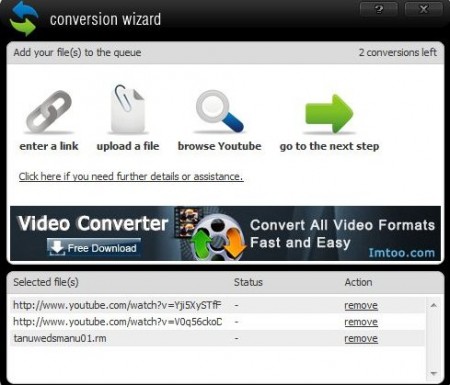
media converter next step
Sponsored Links


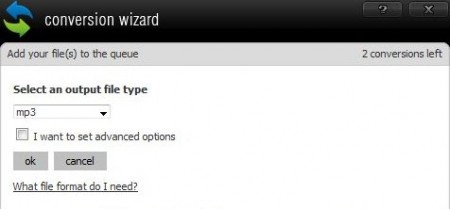
Step 2: Select a file type you want to convert your audio or video in and click “ok”

media converter file format

Step 3: You will be shown a summary of the conversion to be made, click the “start” button.
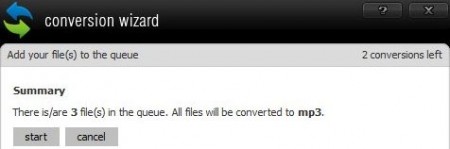
media converter summary
Step 4: The wizard will convert all the files and give you a “download” link to download the files to your computer.
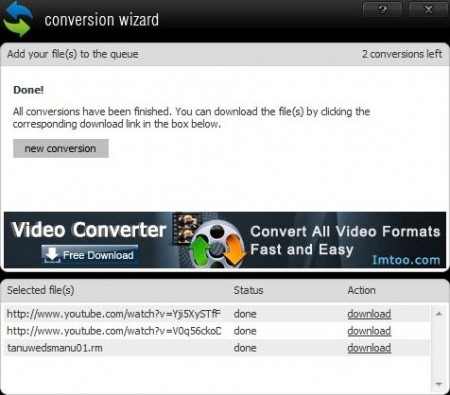
media converter download

Step 5: After downloading the converted files you can click on new conversion and it will take you back to the screen you started with.

You can also check out other articles like ClickConverter, Online File Converter and Any file to audio converter reviewed by us.

While in the select a file type step, you have the interesting option of choosing between two options – either you can convert a video to another format video version only or into audio. If you wish to get unlimited number of downloads, then you can signup for the premium membership which is a paid service and avail extra benefits.

Media Converter is truly a simple and easy online media converter. I would definitely recommend trying it out.

Home Page: Click Here
Free / Paid: Free

Link to This Page:


You Might Also Like:

  1. Convert Audio, Video With Apowersoft Free Online Audio Converter
  2. Free Audio Video Converter: Free Media Converter
  3. Free E-Z Media Converter: Convert All Types of Audio And Video files
  4. Free Online Audio Video Converter: BenderConverter
  5. Any File to Audio Converter to Convert Video to Audio

Be the first to know about Latest Free Software:

  • Join us on Facebook
  • Subscribe to our RSS Feed
  • Follow us on Twitter
  • Subscribe to Email Updates:

Posted in Audio Video Converters, Web Applications | Tagged converter, media converter, video converter | Leave a response

Deepika Arora

« Previous Next »

Featured Posts

  • Top 7 Free Launchers for Android
  • 5 Free Snippet Managers To Manage Code Snippets
  • 5 Free Online Tools To Test Website In Different Resolutions
  • 5 Free Microsoft Access Alternatives
  • 5 Free IP Notifier Apps
  • 5 Online Mapping Websites
  • 5 Free Alternatives To iGoogle
  • 7 Websites To Download Windows 8 Themes

Join More than 15,000 Followers!

Enter your Email Address
  • Submit Software
  • Software Testing Service
  • Write For Us
  • About Us
  • Privacy Policy
  • Disclosure
  • Contact Us

Link to Us:

Did we review your software here? Feel free to flaunt this badge on your website:

Free Software

Use this Code:

Copyright © 2013 I Love Free Software.

Powered by WordPress and Hybrid. New - H