• Home
  • Software Testing Service
  • About US
    • Privacy Policy
    • Disclosure
  • Write For Us
  • Submit Software
  • Contact Us
    • Subscribe
I Love Free Software
Best free software available all over the web. The free software categories include Windows Software, Social Networking Tools, and software installation videos.


  • Featured
  • Windows
  • Web Applications
  • App Store
  • Android
  • iPhone
  • iPad
  • Windows 8
  • Social Networking
  • Programming Tools

Free Video Maker to Create Video From Images, Video, Text: EzVid

By Arvind Kumar on March 17, 2012 | Sponsored Links

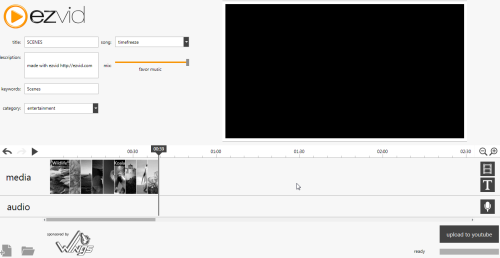
Ezvid is a free Windows video maker which allows you to create videos of your own choice and upload it to YouTube. This free windows video maker allows you to create slideshows, picture videos and still images. It also supports variety of video formats like  *.WMV, *.AVI and*.MOV.

This free video creator is easy to use and fast to download. You can add pictures, videos or text to your video maker. All the videos, images or text is added to the timeline. You can also extend or compress the length of video, text or pictures.

ezvid
Sponsored Links

You can also create or load any project of slideshows. In addition, with this video creating tool you can add sound mix to your videos, text or pictures. It’s also possible to record voice and insert it with pictures, videos and text.

How To Use This Free Video Maker:

  • To use this free video maker, you have to add pictures, video or text.
  • Pictures or videos are automatically added to the timeline.

ezvid 1

  • You can add recorded voice or sound tracks to the video, text or pictures.
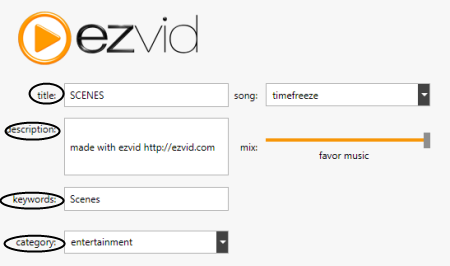
  • You have to add the title and keywords to upload the video.
  • Then, you have to click on “upload to YouTube”.
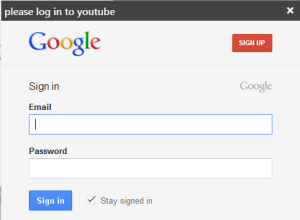
  • Now, you have to provide your Gmail info to upload video to YouTube.
ezvid 3

Key Features Of This Free Video Maker:

  • Easy To access and fast to download.
  • Add pictures, videos, text and recorded voice.
  • Extend or compress the video length.
  • Add sound mix to videos, pictures and text.
  • Upload videos to YouTube.
  • Create and upload new projects.
  • Description, category, keywords and title are also provided.
ezvid 4

  • Shows the preview of video created.

ezvid 2

How To Install Ezvid To Your PC:

  • Visit the link below to install ezvid to your PC or click here.
  • Download the setup to your PC.
  • Double click on the setup downloaded.
  • Follow further instructions to install ezvid to your PC.

Ezvid would automatically be installed to your PC. This free video maker allows you to create videos and upload it to YouTube. Easy to use and fast to download. Free video maker helps to make slide shows. You can also extend or compress the length of video. Try this amazing video maker and upload your creations to YouTube.

Home Page: Click Here
Works With: Windows
Free / Paid: Free

Link to This Page:


You Might Also Like:

  1. Free software To Add Text To Video
  2. Free Online Animation Maker to Create Animations From Video: Coub
  3. Create AVI Video Slideshows From Your Images: Free Slideshow Maker
  4. Stupeflix Video Maker: Free Online Video Maker
  5. Free PDF Maker to Create PDF From Text, Images, and HTML

Be the first to know about Latest Free Software:

  • Join us on Facebook
  • Subscribe to our RSS Feed
  • Follow us on Twitter
  • Subscribe to Email Updates:

Posted in Video Software | Tagged video maker | Leave a response

Arvind Kumar

« Previous Next »

Featured Posts

  • 5 Free Snippet Managers To Manage Code Snippets
  • 5 Free Online Tools To Test Website In Different Resolutions
  • 5 Free Microsoft Access Alternatives
  • 5 Free IP Notifier Apps
  • 5 Online Mapping Websites
  • 5 Free Alternatives To iGoogle
  • 7 Websites To Download Windows 8 Themes
  • 5 Best Free Calculator Apps For Windows 8

Join More than 15,000 Followers!

Enter your Email Address
  • Submit Software
  • Software Testing Service
  • Write For Us
  • About Us
  • Privacy Policy
  • Disclosure
  • Contact Us

Link to Us:

Did we review your software here? Feel free to flaunt this badge on your website:

Free Software

Use this Code:

Copyright © 2013 I Love Free Software.

Powered by WordPress and Hybrid. New - H