• Home
  • Software Testing Service
  • About US
    • Privacy Policy
    • Disclosure
  • Write For Us
  • Submit Software
  • Contact Us
    • Subscribe
I Love Free Software
Best free software available all over the web. The free software categories include Windows Software, Social Networking Tools, and software installation videos.


  • Featured
  • Windows
  • Web Applications
  • App Store
  • Android
  • iPhone
  • iPad
  • Windows 8
  • Social Networking
  • Programming Tools

How To Set A Webpage As Desktop Background In Windows 7

By Mohit Mohan on January 17, 2012 | Sponsored Links

Here, is a short article on How to set a webpage as desktop background in Windows 7. Windows 7 does not allow you to set any webpage as desktop background without use of some software. So in this tutorial I used a software called WallpaperWebpage to set a webpage as desktop wallpaper. Actually this software replaces your active desktop with any webpage which you select. Best thing about this software was that it is easy to use and works fast.

You would also like to check out BingRounder reviewed by us.
Webpage as desktop background 002
Sponsored Links

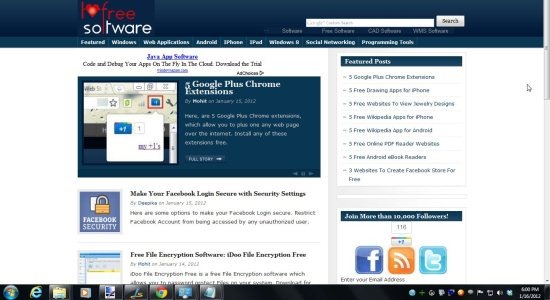
After using this software, I was not satisfied with the results, as you won’t be able to see your active desktop icons. You can see the webpage as desktop background, but it consumes all the desktop icon. Once you exit this software, you can see your desktop icons back like it was earlier. The webpage shown as your desktop background will work on your desktop itself, as you can open the links on that webpage.

The best part is the webpage you set as your desktop background runs and updates in real time. So if you setup your Facebook or Twitter account as the background, you can easily monitor your social life right from your desktop. Also, you can setup YouTube as desktop background and play videos on the desktop itself.

Don’t forget to check out “How to set video as desktop background”.

How To Set A Webpage As Desktop Background In Windows 7

  • Download and run WallpaperWebpage.
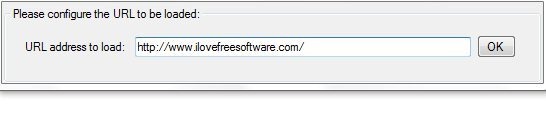
  • Enter the URL of any webpage which you want to set as your desktop background.
Webpage as desktop background 001

  • Click “OK” button.
  • Wait and see your favorite webpage as your desktop background.
  • Sorry to say that you will miss your desktop icons until you exit this software.
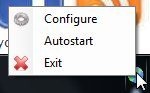
  • For exit, right click on the system tray icon and click on “Exit” option.
Webpage as desktop background 003

Follow these simple steps to set webpage as desktop background.

Works With: Windows
Free / Paid: Free

Link to This Page:


You Might Also Like:

  1. How To Use VLC Media Player To Set Video as Desktop Background
  2. How To Set Video As Desktop Background
  3. Use Video As Desktop Background with Desktop Movie
  4. Set Video Playlist as Desktop Background: Irwin
  5. Create Dynamic Desktop Background Slideshows with AutoBG

Be the first to know about Latest Free Software:

  • Join us on Facebook
  • Subscribe to our RSS Feed
  • Follow us on Twitter
  • Subscribe to Email Updates:

Posted in Desktop Enhancement | Tagged desktop background | Leave a response

Mohit Mohan

« Previous Next »

Featured Posts

  • Top 7 Free Launchers for Android
  • 5 Free Snippet Managers To Manage Code Snippets
  • 5 Free Online Tools To Test Website In Different Resolutions
  • 5 Free Microsoft Access Alternatives
  • 5 Free IP Notifier Apps
  • 5 Online Mapping Websites
  • 5 Free Alternatives To iGoogle
  • 7 Websites To Download Windows 8 Themes

Join More than 15,000 Followers!

Enter your Email Address
  • Submit Software
  • Software Testing Service
  • Write For Us
  • About Us
  • Privacy Policy
  • Disclosure
  • Contact Us

Link to Us:

Did we review your software here? Feel free to flaunt this badge on your website:

Free Software

Use this Code:

Copyright © 2013 I Love Free Software.

Powered by WordPress and Hybrid. New - H