Editor Ratings:
User Ratings:
[Total: 0 Average: 0]
Facebook Chrome Extension provides you Facebook updates right on your desktop. After installing this Chrome extension on your browser you are no longer required to sign in to Facebook time and again to interact with your friends. With the help of this Chrome extension for Facebook you can get updates even when you are not logged in to your Facebook account.
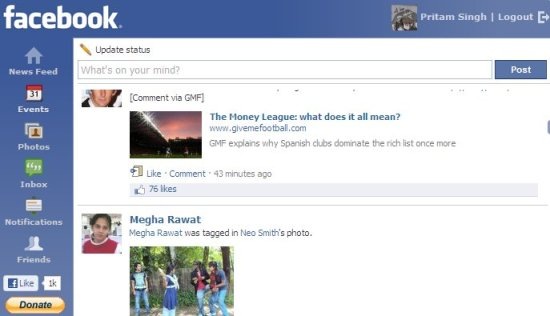
Inside your Facebook updates tool:
The interface of the Facebook updates tool is pretty simple to understand. Here is what all you will see:
- News Feed: You can read latest news from your friends and write comments. Update and post your status.
- Events: You can check recent events like Friends birthday, events created by your friends etc.
- Photos: You will be able to check your and your friends updated Photos.
- Inbox: It will show all send and received messages details.
- Notification: You will get instant notification on receiving messages or invitations.
- Friends: It shows your list of friends and you can search any of them with the help of Search box.
Some key features of Facebook updates Extension:
- Free Chrome Extension.
- Get Facebook updates on the desktop.
- Very easy to install and use.
- Keeps you updated about Facebook activities at all times.
- No need to log in to Facebook every time.
How to install Facebook updates provider:
- Go on to the Chrome ‘web store’ page. Search for Facebook! Chrome extension.
- Click Add to Chrome button.
- Click install button on the installation confirmation window.
- Once installation is completed, a “F” symbol will be visible on the bookmarks bar like shown in the below screenshot.

- Now click on ‘F’ Button it will ask you to login to your Facebook account.
- After singing in you can start getting Facebook updates right through your Chrome browser.

In short, Facebook! Chrome extension makes it easy for you to stay updated with your Facebook account activity without signing in again and again. Install this Facebook updates provider extension in your Chrome browser and enhance your Facebook experience.
