KeyMusic is a free software to play music with PC keyboard while typing. This free software turns your PC keyboard in to a piano. So when you type, you can hear music with each keystroke. This free software to play music with PC keyboard while typing is quite an entertainment which adds fun to your typing work. On a serious note, this music software can make typing an art, since it assigns a soothing sound to each key which allows you to compose music while typing on PC.
Keymusic is a portable software. The music plays anywhere in the entire system.
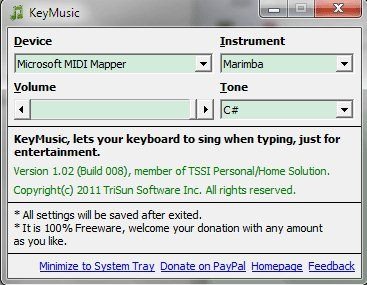
This free key music allows you select a musical instrument you would like to play while typing and the tone of the sounds. It varies from C# and C to B. You can choose from a variety of musical instruments starting right from the classic piano, violin to the carillon and down to the synthesizer sounds and modern bass.
In addition, this software to play music with PC keyboard also authorizes you to adjust the volume using the slider bar. The best part, it automatically saves the settings even if you shut the program so that you do not need to make such adjustments over and over again.
Besides, KeyMusic window never affects the flow of your work because you can click ‘Minimize to System Tray’ in order to hide it. In case you want to see the window, just click the corresponding system tray icon.
Also Check out Free Piano Software reviewed by us.
How to Download KeyMusic:
- Go on to the website
- click on “Free Download”
- Click on “Run” in order to start, you do not require to install
Yupp…its done…listen to your keys…they are giving a soothing music everytime you click a key. You can even adjust the volume. In case you want to stop the playing noise, just close the window. It will automatically stop playing music as well. You can also play Piano on your Computer with a software reviewed by us. Click on the link to read more about the software.
In short, KeyMusic is a platform with which you can make typing on Keyboard, an art and can take this art forward. Go ahead guyzz…get it right away, play music with PC keyboard!!
