ImagesMixer is an innovative, free photo watermarking software which helps you in marking your pictures in order to protect pictures from being copied. This is very helpful for all those who maintain online blogs or profiles with their exclusive pictures which they want to be protected from being copied. We all are aware of the fact that branding acts as one of the best tools to drive people towards your site. Therefore once you watermark your pictures and publish them online you are assured that the authenticity of your website keeps on increasing.
Installing this photo watermarking software
The free watermark software comes from the French developers which is the language you would see on their websites. However the interface of ImageMixer is also available in English. Once you visit their site here and click on the download button at the bottom you would be redirected to the download page. After you have downloaded the program on your system the next step is to run the setup process. The step by step guide will help you to install the software easily on your system. Once installation is over you are ready to launch the program and start using it for your purpose. If you are interested to check out some more watermark software, you can try TSR Watermark Image, JaCo Watermark and Exif wMarker.
Using ImagesMixer
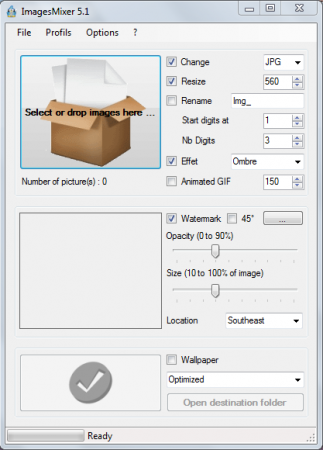
The moment you launch the program you would see a simple window which comes with several option on it. The interface looks quite simple where each of the options looks self-explanatory. At the top you have the menu bar which gives you the option to open files, add watermark, change language and make changes to the preferences in which the software behaves.
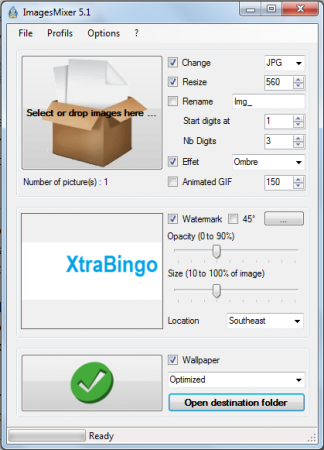
The process is quite simple wherein you just need to drag a picture at the top of the window where it says ‘’Select or drop images here’’. Once you would drag an image to the place a green arrow would appear at the bottom indicating you are ready to use watermarking. Further you may change or resize the image by changing its dimensions on the right side. It also gives you the option to convert the image format where there are four of the formats which it supports. The next thing to do is to select the picture or text you wish to use as the watermark. You can change the opacity of the particular image or make a change to the location where it would be placed from the options on the right side of the window.
After you are done making the changes and selecting your preferences you would have to click on the Green Tick at the bottom. This starts the entire process and would take around 5-6 seconds to complete. Now you can view the image by clicking on Open destination folder at the bottom of your main window.

ImagesMixer further comes with the option of pre-set features which could be engraved on the pictures you wish to watermark. The process of using this application is very simple and indeed very handy.
