TinySpell is a free spell check software that lets you easily detect your spelling mistakes and works with all the applications. The software works from the system tray of your desktop, after you download & install it. It is a very lightweight software and will hardly occupy any space on your PC. Some of the settings that you can perform manually in this software are assign a hotkey, edit dictionary, add new words, enable/disable beep etc.
There are some other free spell check software as well that you can use like Language Tool, Ginger. The download link for this software is given at the end of this article.
How To Use This Spell Check Software?
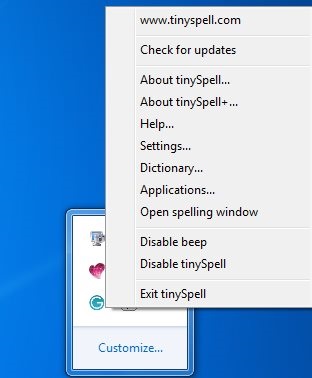
As you can see in the above screenshot, this free spell check software works from the system tray of your desktop, after you download it. All its options can be seen in the right-click context menu. It is very easy to understand all these options and a user manual is also available for your help. Let me describe you the functioning of this software in a step by step manner:
- The first step after installing this software is that you have to select the text that you want to check. The software supports all the applications, so you can select the text from any application like Notepad, Windows Live Writer.
- The second step is to paste the selected text in the spell check window. After you copy and paste the selected text on the small spelling window, the text will appear in Red color. If there is any error in that text, you will hear a small beep in the background and the icon of the software will turn Yellow. If there is no error, the icon will remain White.
- The third step and final step is to look for right options (if there is any error) and replace it with the wrong one. To have a look at the right options, you can either click on the software icon, or press the designated hotkey. The right options will appear and you can replace the wrong text in the window.
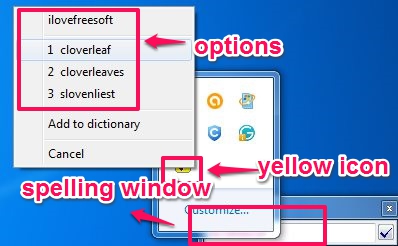
So, this is how this free spell check software works. You just have to follow a simple three-step procedure to detect all the errors in your text.
Add Words To Dictionary:
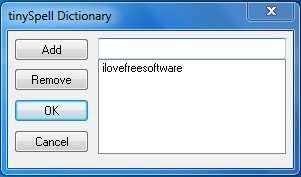
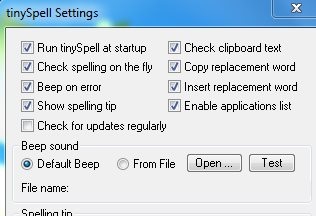
Now, while you are performing these steps, this free spell check software allows you to make some manual changes. The most important of them is that it allows you to edit the dictionary. You can add new words to its dictionary so that it contains words that you regularly use. You can also change the hotkey and enable/disable the beep. This can be done in the settings window.
Features Of TinySpell:
- Supports all applications
- Lightweight
- Runs from system tray
- Corrects both spelling mistakes and Grammatical errors
- Lets you add new words to dictionary
- Lets you set a hotkey
- Lets you enable/disable beep function
- Changes the icon color when there is some error in text
Conclusion:
This free spell check software is a very useful and reliable tool that manages to run without being intrusive at any point. It is almost faultless in spotting errors and provides useful spelling suggestions that make your text absolutely perfect, regardless of what application you are using.
Get TinySpell from here.
