• Home
  • Software Testing Service
  • About US
    • Privacy Policy
    • Disclosure
  • Write For Us
  • Submit Software
  • Contact Us
    • Subscribe
I Love Free Software
Best free software available all over the web. The free software categories include Windows Software, Social Networking Tools, and software installation videos.


  • Featured
  • Windows
  • Web Applications
  • App Store
  • Android
  • iPhone
  • iPad
  • Windows 8
  • Social Networking
  • Programming Tools

Convert Audio Files With MediaHuman Audio Converter

By Arvind Kumar on March 9, 2012 | Sponsored Links

MediaHuman Audio converter is a free software to convert audio files into different formats. You can easily convert audio files in different formats like WMA, MP3, AAC, WAV, AC-3, AIFF, ALAC, FLAC and OGG.

This Software is simplified for the process of audio conversion. This audio conversion software also generates the best quality of sound. MediaHuman Audio converter is fast to access and supports two files conversion at the same time. It might not be equipped with much eye candy, but handles audio conversions quite efficiently. Let us now more about it.
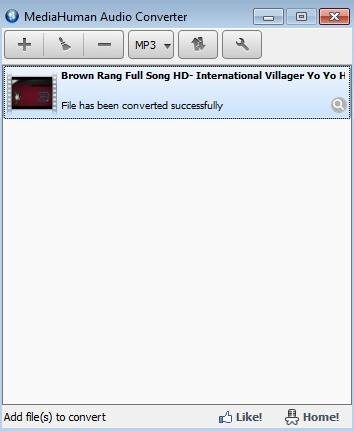
MediaHuman audio convertor
Sponsored Links

You can also click, drag and drop any media file to this audio conversion software. This audio converter auto checks the compatible audio files for iTunes and adds them automatically to mediahuman audio converter. This audio conversion software provides user-friendly interface and is simple to use. The download size of the files is not big and takes a few seconds to install.

Key Features Of MediaHuman Audio converter:

  • Convenient to use.
  • Provides the best quality of sound to your converted files.
  • You can select the source file to remove file after conversion.
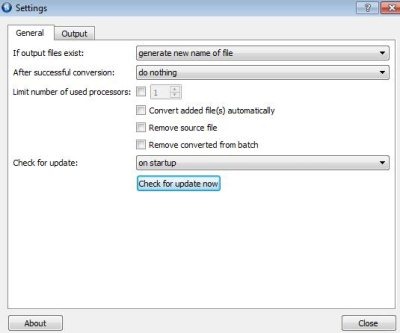
MediaHuman audio convertor 2

  • You set to check updates daily, weekly, manually or on start-up.
  • Drag and drop any audio file for file conversion.
  • Converts files without removing the tags.
  • Supports Multiple operating systems like Windows and Mac OS.
  • Converts multiple files at the same time.
  • Supports multiple files formats like AAC, WMA, MP3, AIFF, FLAC and much more.
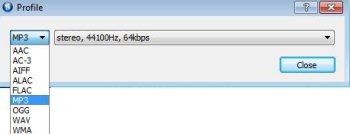
MediaHuman audio convertor 3

How To Install MediaHuman Audio converter To Your PC:

  • To install mediahuman audio converter to your PC, click here.
  • Click on download.
  • A exe file would be downloaded to your system.
  • Double click on the setup downloaded.
  • Follow further instructions to install mediahuman audio converter to your PC.

MediaHuman Audio converter would be automatically installed to your PC. This audio converter provides an enhanced sound quality to the converted audio files. Multiple files can be formatted at same point of time. Try it out and enjoy the enhanced sound quality music.

Home Page: Click Here
Works With: Windows, Mac OS X
Free / Paid: Free

Link to This Page:


You Might Also Like:

  1. Convert over 20 Audio Formats with VSDC Free Audio Converter
  2. Convert Audio Files in Various Formats: Helium Audio Converter
  3. Free E-Z Media Converter: Convert All Types of Audio And Video files
  4. Download Free Audio Converter To Convert Different Audio Formats
  5. Download Audio Converter Free: Moo0 Audio Converter

Be the first to know about Latest Free Software:

  • Join us on Facebook
  • Subscribe to our RSS Feed
  • Follow us on Twitter
  • Subscribe to Email Updates:

Posted in MP3 & Audio Software | Tagged audio converter | Leave a response

Arvind Kumar

« Previous Next »

Featured Posts

  • 5 Free Snippet Managers To Manage Code Snippets
  • 5 Free Online Tools To Test Website In Different Resolutions
  • 5 Free Microsoft Access Alternatives
  • 5 Free IP Notifier Apps
  • 5 Online Mapping Websites
  • 5 Free Alternatives To iGoogle
  • 7 Websites To Download Windows 8 Themes
  • 5 Best Free Calculator Apps For Windows 8

Join More than 15,000 Followers!

Enter your Email Address
  • Submit Software
  • Software Testing Service
  • Write For Us
  • About Us
  • Privacy Policy
  • Disclosure
  • Contact Us

Link to Us:

Did we review your software here? Feel free to flaunt this badge on your website:

Free Software

Use this Code:

Copyright © 2013 I Love Free Software.

Powered by WordPress and Hybrid. New - H