WorkFlowy is a free Web-Based to do list manager that helps you to generate to-do-lists and organize your tasks easily. You can give titles and sub-titles to your various to-do tasks. In addition, once you have completed any of your specified responsibilities, WorkFlowy allows you to mark the performed task as “Completed” which thereby shows an incision onto the typed task and optionally ends-up eliminating it from the list.
Basically, Workflowy allows you to add everything that has messed your mind up and thereafter you can organize things quickly and easily.
The foremost thing that you come across to on WorkFlowy is a complete blank sheet. I guess, that’s quite outraging for many of us. Atleast, I found so. However, as you start working on a WorkFlowy sheet, you will see how you can easily organize a to-do list.
The best part about WorkFlowy is that you do not need to download or install any software. You just need to get registered with the website in order to get access to it.
Here is how to get started with WorkFlowy:
- Go onto the website
- Once you Sign-up, you will immediately get registered
Yup..there you are. Start copying your messed up mind directly to the WorkFlowy sheet. However, if you want to sign-out from WorkFlowy sheet just scroll down and at below-right corner, you will find “Sign-Out”, Click on it. You can take a look at my WorkFlowy sheet in order to get familiar with it:
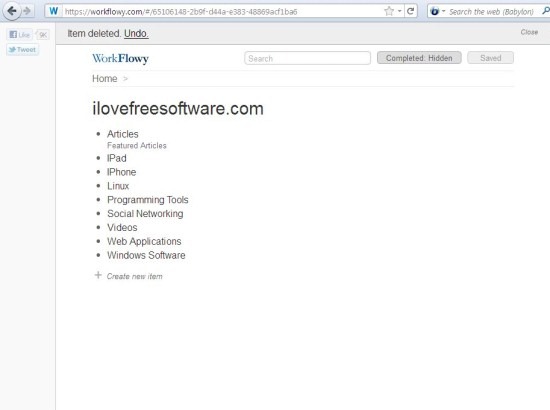
WorkFlowy turns up with pretty cool features.
Lets check out the features that Online To-Do List offers:
- Zoom: It gives you an optional Zoom advantage with which, you can easily zoom the typed word. Once you click on the Zoom option, the item acts as a Sub-Title, thereafter, you can add more content under the created Sub-Title.
- Complete: Once you have completed any of your specified task, WorkFlowy gives you an option to mark it as “Completed” that ends up showing an incision onto the item.
- Hide Completed items: If you want to eliminate your completed task from the list, you can very easily delete it with “Hide Complete items” option.
- Expand or Collapse: WorkFlowy allows you to expand or collapse items wherein you can add or delete content to or from it respectively.
- Delete Item: WorkFlowy deletes the typed task as quickly as you think.
- Notes: You can add various notes as speedily as you think to type.
- Works offline: Once you are signed-in, WorkFlowy continue to work even if you have been disconnected from the internet. It, automatically, synchs up as you re-connect it.
- Keyboard Short-Cuts: WorkFlowy offers you to know various available keyboard short-cuts so as to let you organize things even quickly.
One thing that I found missing while working on Workflowy is a feature to manage schedule. If you want this feature, you can check an online schedule manager.
In short, WorkFlowy is a free to do list web-app that helps you to organize things properly. Thereafter, you can work on them one-by-one. It feels great to mark your responsibility as “Completed”. Believe me, the website is definitely worth trying out. So go ahead and organize your mind..!!
