Sub2DivX is free software to add subtitles to videos in AVI format. This free subtitle software comes with several customization options which makes it easy for you to add subtitles to AVI files.
This freeware basically adds subtitles to videos using (up to 8) .SRT or .IDX/SUB files and creates a new .DIVX file which includes both the video as well as the subtitle.
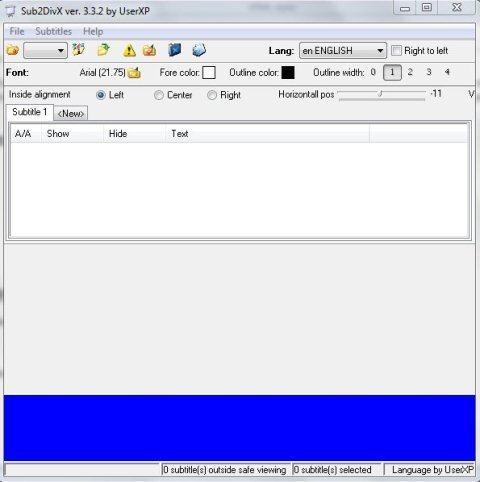
The user-interface is not simple or user-friendly, as it is full of buttons for several operations without any proper explanation. Understanding this free subtitle software may take some time.
This freeware offers several options to adjust subtitles. You can adjust the subtitle position and make it horizontal or vertical, change font size, style and colors of subtitles. Inside alignment option allows you to adjust inside alignment of subtitles, make it left, center or right.
Also, check out free software to view DWG files.
Some Key Features Of Sub2Divx To Add Subtitles To Videos:
- Multi-language user interface.
- No installation required.
- Automatically changes font size of long subtitles.
- Set the position of subtitles as horizontal or vertical.
- Support right to left languages for subtitles
- Adjust the inside alignment between left, center, and right.
- Adjustable font style, size and color for subtitles.
- Change or adjust outline width and color, shadow color.
You would also like to check out free software to format memory card.
How To Get Started with Sub2Divx To Add Subtitles To Videos:
- Open the homepage of this free software and click the “Download” button.
- A zip format file will be downloaded into your system.
- Unzip the zip format file and run the application file.
- You can check the Welcome Dialog in order to get detailed information on it’s usage.
- For accessing Welcome Dialog, click the “Help” option on top of the software interface and click the “Welcome dialog” option.
Sub2Divx is a completely free software to add subtitles to videos files. This subtitle software is feature rich, but the interface is not intuitive. I hope developers of this application work on improving the interface of this otherwise nice software.
