sWeather is a portable, free weather application designed to display local weather information in the program Window and Windows system tray. With the help of this tray-based weather application, you can look up for weather reports regularly through the Internet. Although the configuration might seem a bit difficult, you will gradually get used to it. This free weather software uses the WOEID information which is otherwise known as Where on Earth ID. The users of this software need to enter the WOEID of their location to get the weather updates. For that you need to visit the Yahoo Weather website and enter the zip code or location near the top of the page.
Installing sWeather Application
Installing this free weather app is quite easy and only takes a few seconds. To install the software click here and a zip file will be downloaded. All you need to do is unzip the file in a folder and open it to run the setup file that will install the software on your system. You need to complete the step by step setup which takes a few seconds. Once the software is installed, the main window of the application will open providing you weather updates of the selected city. You can also try other weather apps like mceWeather, The Weather Channel and AccuWeather reviewed by us.
Using sWeather to display local weather info
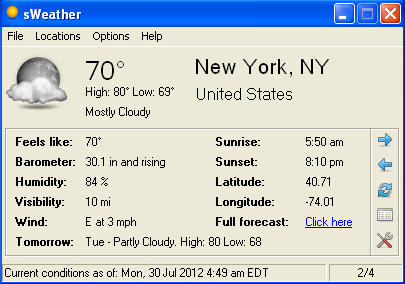
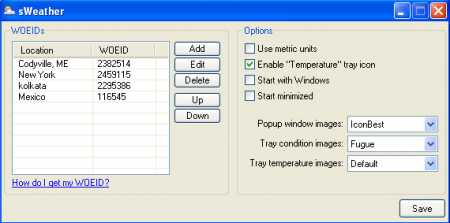
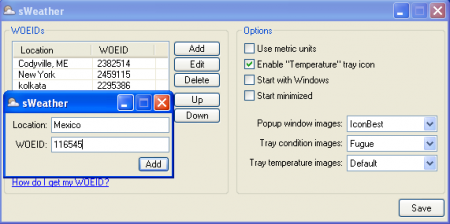
After you have successfully launched the sWeather software a small window will appear on your screen. The Window has four tabs on the top which include File, Location, Option and Help. By default it will show you the weather condition of a place and if you want to find the weather condition of any other place you need to click on ”Option” then select configure. Once you have clicked on configure another new window appears where you need to put the WOEID of the new location. You can get the WOEID of a location by visiting the Yahoo Weather website. There you need to enter the zip code or the name of the location situated near the top of the webpage. Once you have received the WOEID, you need to come back to the software window and click on the add option to put the values in the desired field. Now on the main window you can view the weather conditions of the desired places by clicking on the forward arrow button or the backward arrow button.
If you want a detailed weather report of a place, simply click on the expanded view option. Apart from all these features there are various other options available through which you can change the settings. By default only the ‘Enable temperature tray icon’ will be selected. You can change the popup window images by clicking on the dropdown available. It would even be possible for you to change the Tray condition images by clicking on the dropdown available.
The main window of the application will show various features like barometer, wind, visibility, sunset, sunrise, latitude, longitude, etc. it is possible for you to add as many locations as you like provided that you have their WOEID. So all it can be said is that sWeather is a very handy tool that will allow you to get the weather updates directly on your desktop without making the efforts to search at other places.
