WebCamImageSave is a free software to create time lapse movies with webcam. This software can capture webcam images periodically. In simpler words you just have to set the time with this software and then it captures webcam images one after another.
You can either make time-lapse movies/photos or personal logs with WebcamImageSave. This free time lapse movie software possesses brilliant execution in the webcam capture part as it facilitates you to achieve professional results for Documentary Makers ( Remember the Discovery Channel documentaries ? ) .
For those who want to know what a time-lapse movie is can read this informative article at Wikipedia.
You could also use this free time lapse movie maker for making an observation cycle as well. This free software can also be used as a basic CCTV software, but I would rather go for a specialized webcam surveillance software for that purpose.
Features of free Time Lapse Movie software:
- Free, of course, The web camera software is free of cost. You can capture webcam images and set them in a timeline and achieve desirable result with the software.
- Save images in multiple formats, you can save file in JPG, BMP or PNG. You can specify the file type when you close options and capture webcam images.
- Portable software, the free web camera software is portable and can be carried via USB devices or flash drives.
- Enhanced Customization, you can change the hotkeys, picture colour and the time period of the interval between consecutive captures. Position, colour of the text and the shade configuration can be changed in the options. Advanced users can save stills from command line or batch files
- Windows Utility Software, Works on Windows systems only.
WebCamImageSave has several bugs which you will experience after usage of the webcam software. Nirsoft, the parent company of WebCamImageSave has a good customer support, you should refer to them if you come across any loopholes in web camera software. Reported Issues are an appearance of warning boxes during multiple camera usage or the software may hang during certain circumstances. Another referable point is use of Windows API to control the brightness and contrast which is an external setting.
How to Create Time Lapse Movie:
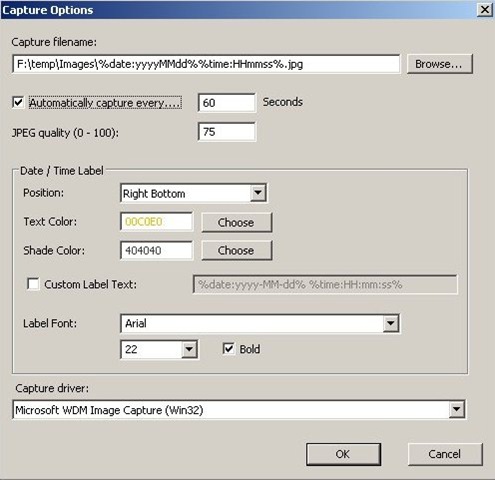
WebcamImageSave is easy to customize. All you have to do is fill up the respective fields in this image capture software. Fill in the Interval time, select the position from the drop down menu, and the text and shade. Specify for providing labels to captures. Specify the Label Font and . Size of the label text, and do provide the capture driver. Hence you can notice the amount of customization you can achieve in this Free Web camera software. You can capture webcam images once when you close the options window.
System Requirements:
The free web camera software works on the following configuration:
- Windows 2000 is the minimum, if you have GDI+ is installed.
- Any WebCam that works with video for Windows
WebCamImageSave is a free web camera software which can capture webcam images periodically. Download WebCamImageSave Free.
