• Home
  • Software Testing Service
  • About US
    • Privacy Policy
    • Disclosure
  • Write For Us
  • Submit Software
  • Contact Us
    • Subscribe
I Love Free Software
Best free software available all over the web. The free software categories include Windows Software, Social Networking Tools, and software installation videos.


  • Featured
  • Windows
  • Web Applications
  • App Store
  • Android
  • iPhone
  • iPad
  • Windows 8
  • Social Networking
  • Programming Tools

Application Manager To Manage Running Apps: Tiles

By Mohit Mohan on December 5, 2011 | Sponsored Links

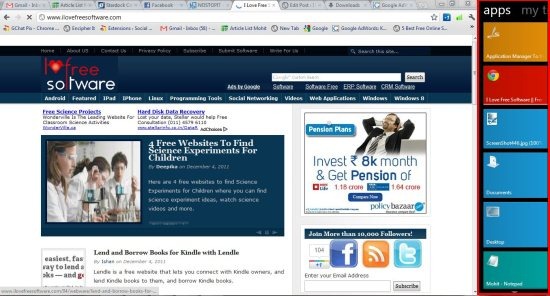
Tiles is a free application manager which allows to view and manage several running applications on your desktop. This application manager by default appears on the right edge of your screen which can be changed later on to left side if you wish. This application manager by default shows you all the current running application in its app page. Docs page shows the recently used documents by application.
Tiles001
Sponsored Links

My tiles page shows all the programs apart from specific apps. With this application manager you can easily move from one application to the next, and Swipe your mouse to switch between my tiles, apps and docs page. Moreover this app manager allows you to configure tiles . You can configure it’s pages,  change appearance, change it’s size and location. It further allows you to configure general settings and advanced settings.

Tiles002

This application manager allows you add shortcuts by dragging and dropping application onto the Tiles bar. You may also include the icons in the system tray and avoid task bar. This app manager is currently available in free version and as well as in paid version.

You would like to check out Circular app launcher.

Some Key Features of this Application Manager:

  • View and manage running application like never before.
  • User friendly interface.
  • Simply Drag and drop programs to add them to Tiles.
  • Configure pages.
  • Control the size and location of the tiles bar.
  • Configure the appearance of Tiles.
  • Windows utility software.
  • Add shortcuts.
  • Launch all the shortcuts on a page with a single click.
  • Hide or rename page.

Also check out free app launcher.

How To Download and Install This Application Manager:

  • Go on to homepage of this application manager.
  • Click on “Free Download” button.
  • An exe file gets downloaded into your system.
  • Simply run the file and follow further installation instructions.

Tiles is a free application manager which enhances you computing life with its amazing user-friendly features and interface. Download it for free.

Home Page: Click Here
Works With: Windows 7, Vista or XP
Free / Paid: Free

Link to This Page:


You Might Also Like:

  1. Application Manager to Install, Update and Download Apps: Soft2Base
  2. Process Hacker: Manage Services Running on PC
  3. SMART: Free Software to Manage Services Running in Windows
  4. Quick Cliq: Application Launcher, Clipboard Manager, Memo Manager
  5. Free Startup Manager to Manage Windows Startup Programs: Starter

Be the first to know about Latest Free Software:

  • Join us on Facebook
  • Subscribe to our RSS Feed
  • Follow us on Twitter
  • Subscribe to Email Updates:

Posted in Desktop Enhancement | Tagged app launcher, application manager | Leave a response

Mohit Mohan

« Previous Next »

Featured Posts

  • 5 Free Snippet Managers To Manage Code Snippets
  • 5 Free Online Tools To Test Website In Different Resolutions
  • 5 Free Microsoft Access Alternatives
  • 5 Free IP Notifier Apps
  • 5 Online Mapping Websites
  • 5 Free Alternatives To iGoogle
  • 7 Websites To Download Windows 8 Themes
  • 5 Best Free Calculator Apps For Windows 8

Join More than 15,000 Followers!

Enter your Email Address
  • Submit Software
  • Software Testing Service
  • Write For Us
  • About Us
  • Privacy Policy
  • Disclosure
  • Contact Us

Link to Us:

Did we review your software here? Feel free to flaunt this badge on your website:

Free Software

Use this Code:

Copyright © 2013 I Love Free Software.

Powered by WordPress and Hybrid. New - H