BatchRename is a simple yet powerful, free file management application using which you can rename a batch of files quickly. This free batch file renaming software is free to download and use.
Many would love to keep their files organized. But seldom they succeed in their attempts as the file management job is quite laborious. It can take hours or even a few days to complete depending upon the amount of files to be organized. But there is a quick and effective solution to this. It is BatchRename. Using this free batch file renaming tool, you can rename a bunch of similar files within seconds. People interested to try some more file renaming utility can also try Siren, Rename Master and Bulk Rename Utility.

Features of batch file renaming software
- Rename using ID3V1 mp3 tag: You can rename mp3 files using their ID3V1 tags. BatchRename accesses title, album, genre etc., of the mp3 files for renaming them appropriately.
- Rename using EXIF data: You can rename image files using EXIF data. BatchRename can read digitized date, time, original date, time, camera name, exposure time, lens aperture etc., and can use them in renaming.
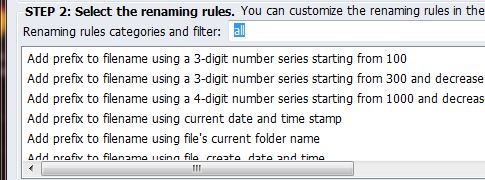
- Basic renaming rules: Besides these BatchRename offers all the basic renaming operations like prefix, suffix, truncate, remove, replace, lowercase, uppercase etc.
- Change a part of Filename: BatchRename can change even a part of the filename while most general applications cannot change a part of the file name.
- Customizable: Using BatchRename you can create your own renaming rule. This makes sure that all your typical needs are met with.
- Preview & Undo Renaming: You can preview the result of renaming and you can undo the last renaming operation.
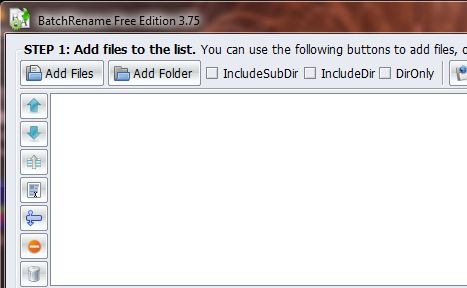
- User interface: The user interface is designed in such a way that it automatically guides you step by step into your renaming work.

How to use this batch file renaming tool?
Renaming has never been so easy and fast as it is with BatchRename! Here is a simple 3 step process to rename a bunch of your files.
- Choose you files: Add the bunch of files or folders you wish to rename. Renaming will be effective if the added files or folders require a similar type or renaming. You can use the file filter option if you so need to filter out a particular type of file. Quick view helps you have a look at the selected image file or plays it if it is a audio or video file so that you can be sure of the selected file.
- Choose your rename rule or create one: Choose one renaming rule from the predefined rule list which matched your need. If nothing matches your need don’t worry, you can create one! Using the create rule you can create the renaming rule you wish. You can also save it so that you can use it quickly in the future.
- Start renaming: After you have selected or created the renaming rule you can make sure that it is the correct one by using the preview option. Then you can go ahead and do your renaming operation. All the chosen files are renamed according to the rule in a few seconds. If something goes wrong then you can always undo the renaming operation so that you get back the original files.
With its well planned setup and amazing flexibility, BatchRename offers simple, easy, effective and lightening fast renaming of your files. The application is compact when compared to its features and works efficiently. BatchRename installs smoothly and works without bugs or crashes when tested. If you want to use a cool renaming application then it has to be BatchRename. Give it a try.
