• Home
  • Software Testing Service
  • About US
    • Privacy Policy
    • Disclosure
  • Write For Us
  • Submit Software
  • Contact Us
    • Subscribe
I Love Free Software
Best free software available all over the web. The free software categories include Windows Software, Social Networking Tools, and software installation videos.


  • Featured
  • Windows
  • Web Applications
  • App Store
  • Android
  • iPhone
  • iPad
  • Windows 8
  • Social Networking
  • Programming Tools

Download Images in Multiple Formats with DownIMG

By Tushar on November 2, 2011 | Sponsored Links

Download Images in multiple formats with Image Downloader DownIMG. What’s so special about DownIMG. This free image downloader allows you to download online images in multiple formats. So you don’t need to download the image and then convert image format. This saves you a lot of unnecessary effort where you have to install an image converter separately. Moreover, you compromise on a hefty amount of Disk Space. This is where DownIMG comes in handy. All I can say is that it is one of the best tools to download images free.


Sponsored Links

Features of Image Downloader DownIMG:

  • Free, the image downloader is free to install.
  • Simple, simple download procedure for installing DownIMG.
  • Easy to operate, even amateurs can operate DownIMG. So you can download images free without much to fret about.
  • Inbuilt image converter, DownIMG has an inbuilt image converter.
  • Doesn’t occupy much Disk Space, the software is small and doesn’t occupy much space. Download Images free without slowing your system.
  • Supports all popular formats, download images  in PNG, JPEG and GIF formats.

How to download images free with DownIMG:

DownIMG is simple and easy to operate. Follow the underlying procedure to ensure a hassle free functionality.

  • Visit the Homepage.
  • Scroll down to DownIMG. Locate the Download Link and Click on it to initiate the download.
  • Post download, launch the Program.
  • A pop-up appears as shown in the screenshot.
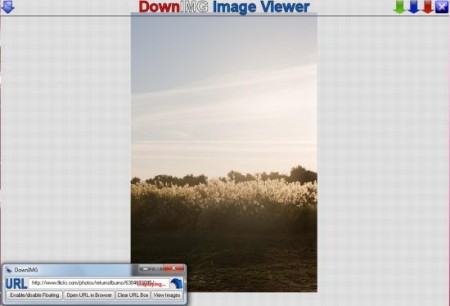
Image downloader download images free DownIMG

  • Copy the URL of the image and paste it in the URL panel.
  • After pasting, look at the end of the panel. You can see Displaying in Red. Wait till it says Ready.
  • Then click on View Images.
  • A Screen/Interface for download opens. Click on the download buttons. There are four download buttons for each format.

DownIMG is easy to use and convenient software which allows you to download images in multiple formats free. Download DownIMG free.

Home Page: Click Here
Works With: Windows XP, Windows Vista, Windows 7
Free / Paid: Free

Link to This Page:


You Might Also Like:

  1. Free Image Converter to Convert Images to Various Formats: FlipExt
  2. Free Online Image Format Converter: i2img
  3. Download All Images from Website: NeoDownloader Lite
  4. Convert over 20 Audio Formats with VSDC Free Audio Converter
  5. Free Image to Video Converter: Convert Images to Video

Be the first to know about Latest Free Software:

  • Join us on Facebook
  • Subscribe to our RSS Feed
  • Follow us on Twitter
  • Subscribe to Email Updates:

Posted in Image & Photo | Tagged free image viewer, image converter, image downloader, image downloaders, image format | Leave a response

Tushar

« Previous Next »

Featured Posts

  • Top 7 Free Launchers for Android
  • 5 Free Snippet Managers To Manage Code Snippets
  • 5 Free Online Tools To Test Website In Different Resolutions
  • 5 Free Microsoft Access Alternatives
  • 5 Free IP Notifier Apps
  • 5 Online Mapping Websites
  • 5 Free Alternatives To iGoogle
  • 7 Websites To Download Windows 8 Themes

Join More than 15,000 Followers!

Enter your Email Address
  • Submit Software
  • Software Testing Service
  • Write For Us
  • About Us
  • Privacy Policy
  • Disclosure
  • Contact Us

Link to Us:

Did we review your software here? Feel free to flaunt this badge on your website:

Free Software

Use this Code:

Copyright © 2013 I Love Free Software.

Powered by WordPress and Hybrid. New - H