IconArt is a free Cursor creator which allows you to create cursors and icons which are fully customized. This cursor creator includes several tools and other stuff which helps you to create cursors according to your wish. It allows you to directly draw a mouse cursor from scratch, or directly import an image for modifying it into a Cursor or an icon. This cursor creating software supports full animated and static mouse cursors. You may even add text in your creativity.
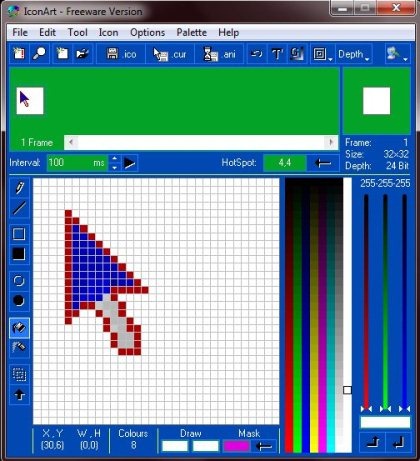
This cursor creating software allows you to create cursors using it’s several user-friendly tools like pen, line, circle, box, filled box, filled circle, spray etc. It includes an option which allows to even change the software theme, as it includes few inbuilt themes. You may also add frames or text to your drawings. This cursor creating software is currently available in free version and professional version (paid). Watch a video tutorial for how to make a custom mouse cursor.
Don’t forget to check out RealWorld Cursor Editor reviewed by us.
Key Features of this create Cursors software:
- Create cursors or icons.
- Use tools like pen, line, circle, box, filled box, etc.
- Includes options for Color Pallet.
- Supports animated and static mouse cursors.
- Several Color depth options.
- Directly import images for creating cursors or icons.
- Text can be added.
- Icons created can be assigned to folders.
- Rotate, flip or move icons.
- Icons can be extracted from .exe files or .dll files.
Also check out free software to get custom cursors.
Download and Install this create Cursors software:
- Go on to homepage of this cursor Creator.
- Click on Download IconArt.
- Click on the link which further takes you to “Download” window.
- Click on Download now button.
- An exe file gets downloaded into your system.
- Run the file, that’s all.
IconArt is a free Cursor creating tool with several user-friendly drawing tools and other options which allow you to create stunning cursors and icons. Download it for free.
