Synfig Studio is a free open source 2D animation software. It uses vector and bitmap artwork to create high quality animations. It breaks from the norm of frame by frame animation allowing you to create high quality animations with less resources. Synfig Studio is a multiplatform software available in Windows, Linux and MacOS. Synfig Studio does has its vectors done in a powerful industry standard application that you don’t have to pay for. Animations are represented in a custom file type, “.sifz”.
Features of this free Animation Software
Some of Synfig Studio features include
- Synfig Studio supports various types of layers including geometric, gradients, filters, distortions, transformation and fractal.
- The spatial resolution feature allows for most elements to be vector based and layers to be generated using a set of parameters. Also it allows for a degree of flexibility in that if the resolution of a project is to change, in built components are not affected and only imported raster images are pixelated.
- Temporal resolution independence automatically blends animation key frames to produce smooth motion.
- High Dynamic-Range Imaging uses floating point mathematics to perform calculations. This allows canvases to get the right pixel luminance resulting in better image lighting and colour composition
- The Path-based Gradients feature which is only available in professional animation software helps to add soft shading to the animation and save you the trouble of painting every frame. This is done via gradient paths which run along shapes.
The Interface
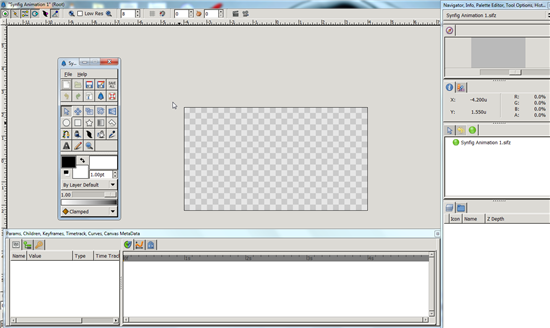
Surprisingly, Synfig Studio launches from the windows command prompt. On launching the program you are bombarded by a clutter of windows which is not very pleasant. If you are a first time user like I was, it does not get any better. Finding your way among this maze of widows is almost impossible and it will take time before you get up to speed. Tooltips are well used all round the application.
Opinion
The Linux version of Synfig Studio offers more features than its windows counterparts- they opted to do two different software to run on different platforms instead of a single software that is similar on both platforms. The launching of the program from the windows command prompt leaves a lot to be desired-once you closed the command prompt window the application crashed instantly. Lack of a main window meant that the typical menu bar at the top wasn’t there.
The program would have done much better with a parent window and the rest of the windows could have been added as toolbars. It also lacked support for 3D animation. Using a single window could have made the program a bit tidy and I found the many small windows quite annoying. I was quite relieved to find tooltips as none of the icons looked familiar. While tutorials and FAQs were available, you had to be online to access them.
Synfig Studio is not what you can call easy to use but this is best left to professionals familiar with animation software. I took me quite some time before I could get used to.
Verdict
Synfig Studio is the nice option for anyone looking for a free professional 2D animation software or you can always try SharpAnimator which is much better compared to Synfig Studio.
