• Home
  • Software Testing Service
  • About US
    • Privacy Policy
    • Disclosure
  • Write For Us
  • Submit Software
  • Contact Us
    • Subscribe
I Love Free Software
Best free software available all over the web. The free software categories include Windows Software, Social Networking Tools, and software installation videos.


  • Featured
  • Windows
  • Web Applications
  • App Store
  • Android
  • iPhone
  • iPad
  • Windows 8
  • Social Networking
  • Programming Tools

TweakNow: Free System Utilities to Speed up your Computer

By Ishan Bansal on September 30, 2009 | Sponsored Links

TweakNow is fantastic suite of free system utilities to completely tweak your PC, and speed up its performance. Most of the system utilities available out there are only for specific functions, such as registry cleaners, disk usage analyzers, disk cleaner, uninstaller etc. TweakNow on the other hand is one comprehensive suite of free system utilities that has all these, and much more.
TweakNow has following system utilities:
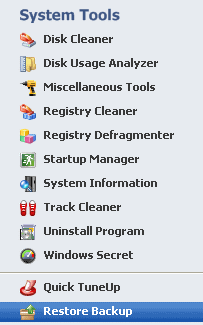
Registry Cleaner: This works like a normal registry cleaner, and helps you clean up the registry of invalid registry entries. This is one of the best options to speed up your computer.
Registry Defragmenter: This defragments all the your registry, and compress the registry size. Another effective option to speed up your computer.
Startup Manager: This shows you all the programs that start when your computer starts. You might be surprised to see the list, and number of programs. There might be many programs in there that you didn’t want to start, but they set themselves to start with your computer. This is one of the main reasons for slow start of the computer. You can just uncheck all the programs that you do not want to start with your computer, and that should reduce startup time of your computer.
Disk Cleaner: This helps clean your disk from temporary and unwanted files, and saves you some disk space.
Disk Usage Analyzer: This is a nice tool to find biggest files that are taking up your disk space. You can then choose to delete unwanted files from that list, and gain some space.
Uninstall Program: This is an easy and simple tool to uninstall any program. It completely uninstalls the program, and remove all traces of that from system.
Track Cleaner: This helps clean the temporary internet files, cookies, and your browsing history. In one click, you can clear temporary files from all your browser. I have Internet Explorer, Firefox, and [Google Chrome] installed on my system. Interestingly, Track Cleaner gave me option to clean files of IE and Firefox, but not for Google Chrome.
Apart from these, TweakNow also has options to show your system information, and do some advanced settings.
One of my favorite option in TweakNow is Quick Tuneup. It quickly fixes problems with registry, and cleans internet files with just one click.
TweakNow is a full featured suite of free utilities that should help you in getting your system performance back. Best of all, it is totally free. Love it!

TweakNow is fantastic suite of free system utilities to completely tweak your PC, and speed up its performance. Most of the system utilities available out there are only for specific functions, such as registry cleaners, disk usage analyzers, disk cleaner, uninstaller etc. TweakNow on the other hand is one comprehensive suite of free system utilities that has all these, and much more.

TweakNow has following system utilities:

TweakNow Free Suite of System Utilities
Sponsored Links

Registry Cleaner: This works like a normal registry cleaner, and helps you clean up the registry of invalid registry entries. This is one of the best options to speed up your computer.

Registry Defragmenter: This defragments all the your registry, and compress the registry size. Another effective option to speed up your computer.

Startup Manager: This shows you all the programs that start when your computer starts. You might be surprised to see the list, and number of programs. There might be many programs in there that you didn’t want to start, but they set themselves to start with your computer. This is one of the main reasons for slow start of the computer. You can just uncheck all the programs that you do not want to start with your computer, and that should reduce startup time of your computer.

Disk Cleaner: This helps clean your disk from temporary and unwanted files, and saves you some disk space.

Disk Usage Analyzer: This is a nice tool to find biggest files that are taking up your disk space. You can then choose to delete unwanted files from that list, and gain some space.

Uninstall Program: This is an easy and simple tool to uninstall any program. It completely uninstalls the program, and remove all traces of that from system.

Track Cleaner: This helps clean the temporary internet files, cookies, and your browsing history. In one click, you can clear temporary files from all your browser. I have Internet Explorer, Firefox, and Google Chrome installed on my system. Interestingly, Track Cleaner gave me option to clean files of IE and Firefox, but not for Google Chrome.

Virtual Desktop: The Virtual Desktop module lets you run as many as four custom-designed desktop configurations simultaneously, allowing you to tailor your computer screen to your mood and your work requirements.

Apart from these, TweakNow also has options to show your system information, and do some advanced settings.

One of my favorite option in TweakNow is Quick Tuneup. It quickly fixes problems with registry, and cleans internet files with just one click.

TweakNow is a full featured suite of free utilities that should help you in getting your system performance back. Best of all, it is totally free. Love it!

Home Page: Click Here
Works With: Windows
Free / Paid: Free

Link to This Page:


You Might Also Like:

  1. Tweaknow RegClean: Free Registry Cleaner Software
  2. Speed Up Your PC with Acebyte Utilities
  3. 5 Free PC Speed Up Software
  4. Speed Up your Computer with Soft4Boost Disk Cleaner
  5. FCleaner: Freeware to Clean up Registry and Disk

Be the first to know about Latest Free Software:

  • Join us on Facebook
  • Subscribe to our RSS Feed
  • Follow us on Twitter
  • Subscribe to Email Updates:

Posted in System Utilities | Tagged disk analyzer, download tweaknow, Free Disk Usage Analyzer, free registry cleaner, free system utilities, system utilities, tweaknow, uninstaller | 4 Responses

Ishan Bansal

  • Pingback: Download Microsoft Fix it Center - Fix PC Problems | I Love Free Software

  • Pingback: Download Abyssal Free Registry Cleaner | I Love Free Software

  • http://www.artviper.de SEO München

    Thank's for sharing this software. It will help me to speed up my laptop. I will share it to my friends and relatives.

  • http://www.noba.co.uk/services/emergency-internet/ jes01jones

    I am not sure if this will work on my old laptop but I will try it. Thanks with this.

« Previous Next »

Featured Posts

  • 5 Free Snippet Managers To Manage Code Snippets
  • 5 Free Online Tools To Test Website In Different Resolutions
  • 5 Free Microsoft Access Alternatives
  • 5 Free IP Notifier Apps
  • 5 Online Mapping Websites
  • 5 Free Alternatives To iGoogle
  • 7 Websites To Download Windows 8 Themes
  • 5 Best Free Calculator Apps For Windows 8

Join More than 15,000 Followers!

Enter your Email Address
  • Submit Software
  • Software Testing Service
  • Write For Us
  • About Us
  • Privacy Policy
  • Disclosure
  • Contact Us

Link to Us:

Did we review your software here? Feel free to flaunt this badge on your website:

Free Software

Use this Code:

Copyright © 2013 I Love Free Software.

Powered by WordPress and Hybrid. New - H