• Home
  • Software Testing Service
  • About US
    • Privacy Policy
    • Disclosure
  • Write For Us
  • Submit Software
  • Contact Us
    • Subscribe
I Love Free Software
Best free software available all over the web. The free software categories include Windows Software, Social Networking Tools, and software installation videos.


  • Featured
  • Windows
  • Web Applications
  • App Store
  • Android
  • iPhone
  • iPad
  • Windows 8
  • Social Networking
  • Programming Tools

Free NFO Viewer and Text Editor : NFOPad

By Mohit Mohan on November 30, 2011 | Sponsored Links

NFOPad is a free NFO viewer and text editor for your desktop. If you are wondering what an NFO file is, check out a good explanation offered by Wikipedia here. This free NFO viewer is fast, small in size and flexible unlike any other NFO viewer/reader. It is similar to Microsoft notepad, but includes more features and is highly customizable than a notepad. It allows you to customize colors, app settings and fonts.  This free NFO viewer is efficient enough to support NFO files containing ASC2 art. And its available in multiple languages such as English, German,English, Korean, Polish, Chinese etc.
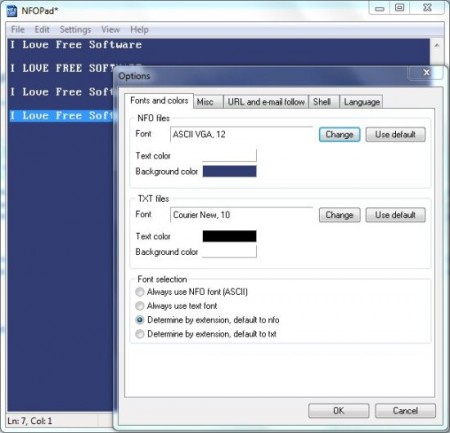
nfopad options
Sponsored Links

This free NFO viewer allows you to insert date/time, includes word wrap option. Moreover you may also print directly with the print option available. Presently, this free NFO viewer is available in 2 versions which are “Installer” and “Portable”. Installer will download an exe file in your system. Whereas portable download will be a .rar file which you will have to unrar using some decompression software like RARZilla.
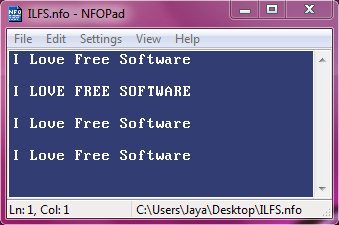
nfopad nfo file

Also check out Word Reader reviewed by us.

Some Key Features of This free NFO Viewer:

  • Detects email and hyperlinks.
  • Windows utility software.
  • Customizable colors, app settings, fonts.
  • Print option available for printing.
  • In built ASC2 fonts.
  • Available in portable version.
  • Search and replace text.
  • Overwrite/insert mode.
  • Option for word wrap is available.
  • “Go to” option for directly going onto specific line by entering the line number.
  • Delete a line with delete line option.

How To Download and Install This free NFO Viewer:

  • Go on to homepage of this NFO Viewer and click on “Installer” for downloading installer version.
  • An exe file gets downloaded into your system.
  • Run the file and follow further installation instruction.

NFOPad is a free NFO viewer which is similar to Microsoft notepad, but includes more features than a notepad. Download it for free.

Home Page: Click Here
Works With: Windows 7, Vista, XP and 2000
Free / Paid: Free

Link to This Page:


You Might Also Like:

  1. See Text in All Installed Fonts: CPS Font Viewer
  2. Free Text Editor to Replace Windows Notepad: GetDiz
  3. Wildbit Viewer: Free Image Viewer, Slideshow Maker, Image Editor
  4. Free Text Editor with Tabs: Caderno
  5. Free Docx Viewer to View Docx Files without Microsoft Word

Be the first to know about Latest Free Software:

  • Join us on Facebook
  • Subscribe to our RSS Feed
  • Follow us on Twitter
  • Subscribe to Email Updates:

Posted in System Utilities | Tagged free nfo viewer, notepad, utility software | Leave a response

Mohit Mohan

« Previous Next »

Featured Posts

  • Top 7 Free Launchers for Android
  • 5 Free Snippet Managers To Manage Code Snippets
  • 5 Free Online Tools To Test Website In Different Resolutions
  • 5 Free Microsoft Access Alternatives
  • 5 Free IP Notifier Apps
  • 5 Online Mapping Websites
  • 5 Free Alternatives To iGoogle
  • 7 Websites To Download Windows 8 Themes

Join More than 15,000 Followers!

Enter your Email Address
  • Submit Software
  • Software Testing Service
  • Write For Us
  • About Us
  • Privacy Policy
  • Disclosure
  • Contact Us

Link to Us:

Did we review your software here? Feel free to flaunt this badge on your website:

Free Software

Use this Code:

Copyright © 2013 I Love Free Software.

Powered by WordPress and Hybrid. New - H